
How to Grow on TikTok Without Engaging With Other Accounts
Learn how to grow on TikTok without engaging with other accounts. Cut low value habits, protect sales and feedback, and test what the saved time is worth.
On this page
What does it take to grow on TikTok without engaging?
You can save hours on TikTok and still lose growth if you cut the wrong work. Start by separating routine activity from the work that brings viewers, ideas, or sales.
The short answer
You can plan to grow on TikTok without engaging with other accounts each day. Keep a way to learn from viewers, answer buying questions, and get each new post discovered.
What to protect when you cut back
- Discovery: if comments bring people to your profile, plan another route to your posts.
- Feedback: save the questions and objections that help you make stronger videos.
- Buyer support: keep replies that help someone choose, order, or solve a problem.
What You’ll Learn
- What to cut: judge engagement habits by their results and time cost.
- What to replace: build posts and discovery routes that work while you’re away.
- What to measure: test a lighter routine without mistaking one weak post for a trend.
Does engaging with other accounts actually help you grow?
It can help through profile visits, relationships, and better knowledge of your audience. TikTok does not publish a rule that requires outbound likes or comments before your videos can reach people.
TikTok’s recommendation guide names viewer actions, content details, and user information among its signals. It also explains how your actions shape what you see.
That leaves two claims to avoid: “You must engage to grow” and “Your activity can never affect growth.” Neither follows from the guide.
| What you do | How it could help | What that does not prove |
|---|---|---|
| Leave a useful comment on another post | Someone notices your answer and visits your profile | Your next video gets an automatic reach boost |
| Read posts and questions in your niche | You find better topics, examples, or wording | Scrolling itself earns reach |
| Reply to someone on your video | You clear up doubt, build trust, or help them buy | Each reply has a fixed effect on reach |
| Like and watch videos in your niche | You shape your own feed and find useful creators | Your feed is the audience for your uploads |
A common mistake is to cut all four at once. If results fall, you can’t tell whether you lost profile visits, useful ideas, or sales replies. You only know that a bundle of changes went badly.
Treat viewers’ likes, shares, and comments as a separate measure. Our TikTok engagement rate guide covers that side of the picture.
Which engagement tasks should you stop, keep, or replace?
Judge each task by the result it produces and whether your presence is needed. A habit with no clear purpose is easier to cut than a source of buyers or content ideas.
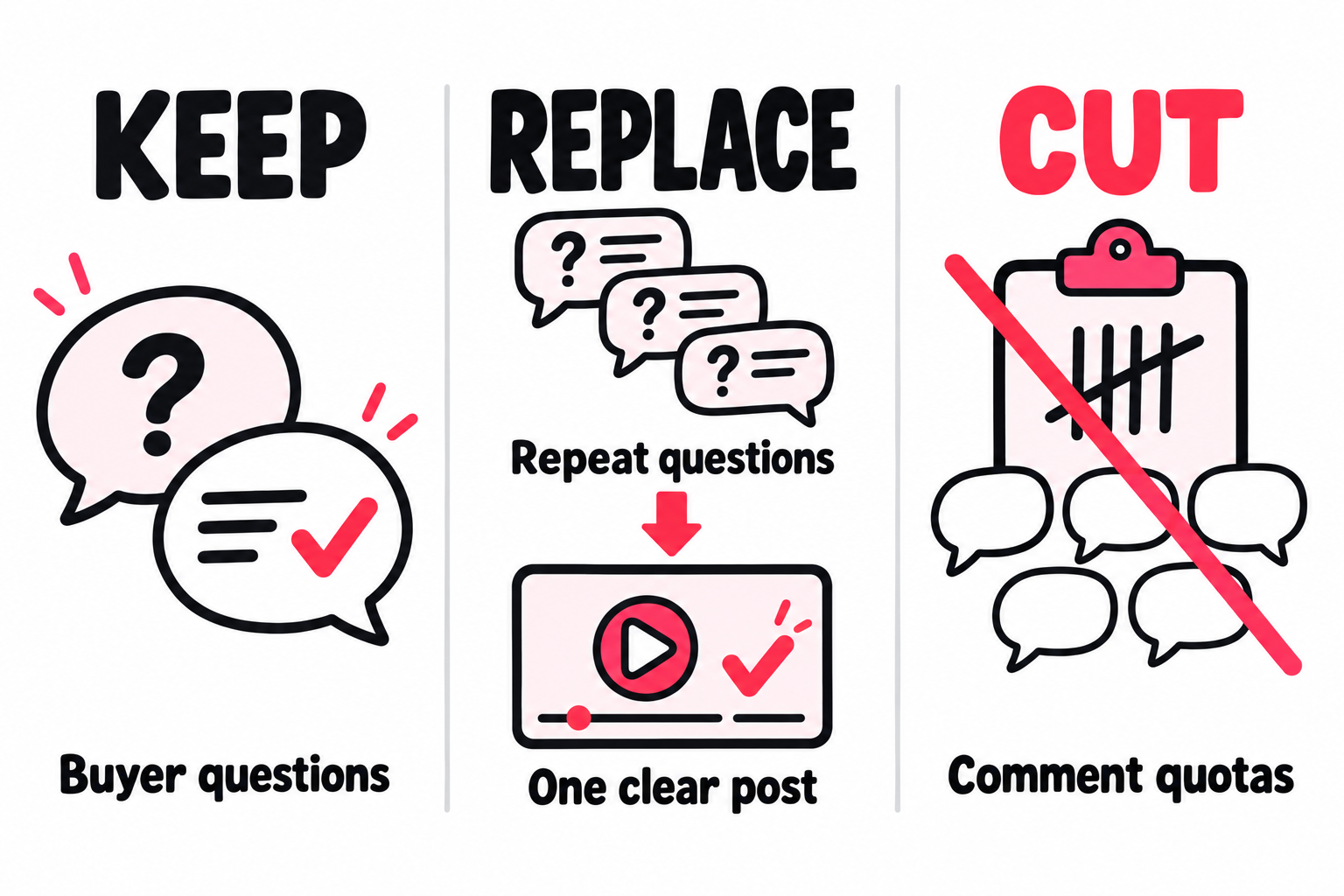
Review one normal week. For each engagement session, record its purpose, minutes spent, and useful result. Useful results could be a sales inquiry, a new contact, or a question you turn into a post.
Keep “no result seen” separate from “proved useless.” You may not be able to trace a profile visit to a comment. Mark that link as unknown rather than inventing credit.
| Pattern in your week | Next decision |
|---|---|
| The same generic comments, with no clear result | Pause the habit and test the change |
| A few niche threads lead to useful contacts | Keep those threads; drop the need to engage everywhere |
| Buyers ask the same questions each day | Put the answers in the post or linked details |
| New, detailed questions lead to strong videos | Keep a way to collect them, even if someone else sorts them |
| Praise and emojis take most of your reply time | Set a limit without holding up questions that need help |
For a creator, a relationship with another creator may matter more than this week’s follower count. For a business, a reply that saves a sale can matter more than extra views. Use the goal you actually have.
How do you replace what you learn from scrolling?
Keep a small research loop built around gaps in your knowledge. Your own analytics show how people reacted to what you posted; they can’t show every topic you should have tried.
If you only repeat past winners, your idea pool can shrink. If you only browse your feed, you see a sample shaped by your own habits. Use both with a clear question.
For each batch of posts, collect three kinds of evidence:
- Demand: a question or problem people are trying to solve.
- Missing detail: what current answers fail to explain or show.
- Your proof: the test, result, footage, or experience you can add.
Use Creator Search Insights, where available, to find searched topics and gaps in available content. A gap is a lead to check, not proof the topic fits your account.
Our Creator Search Insights walkthrough covers the tool. The TikTok target audience guide helps you judge whether the people behind a topic are the ones you want to reach.
End the research session with a decision: make this post, gather more proof, or reject the idea. A saved clip with no reason attached just adds to next week’s work.
For example, a potter may find that viewers keep asking if a mug fits under a coffee machine. The useful gap isn’t another mug video. It’s a size test with a ruler, the space under the spout, and room to lift the mug out.
That brief tells the creator what to film. It also removes a question they would otherwise answer one reply at a time.
How do you make posts that work when you’re offline?
Give the viewer enough proof and detail to act without waiting for a reply. Check where each post depends on you being present, especially its call to action.
A promise to send details by DM creates work after publishing. So does a claim that leaves out the terms, a demo with no size shown, or an offer with no clear next step.
| Part of the post | Creates a need for your reply | Can work while you’re away |
|---|---|---|
| Proof | “This works. Ask me how.” | Show the method, result, and where it may fail |
| Buying detail | “Comment for sizes.” | Show the size and point to the full size guide |
| Next step | “DM me for the checklist.” | Point to a working route that delivers it without a personal reply |
| Follow promise | “Follow for more.” | Name the next useful lesson or test |
The goal is to reduce avoidable back and forth. Some sales need a personal chat, and some creators want that contact. Keep it when it serves the goal and you can support it.
Here is a fictional product example:
Needs a reply: “Will this mug fit your coffee machine? Comment SIZE and I’ll help you choose.”
Works without a reply: “This mug is 9 cm tall and 8 cm wide. Measure from your drip tray to the spout, then allow room to lift it out. The full size and stock guide is linked on my profile.”
Use your actual measurements and a link route your account supports. You still welcome questions, but the buyer can make the basic fit check without waiting for you.
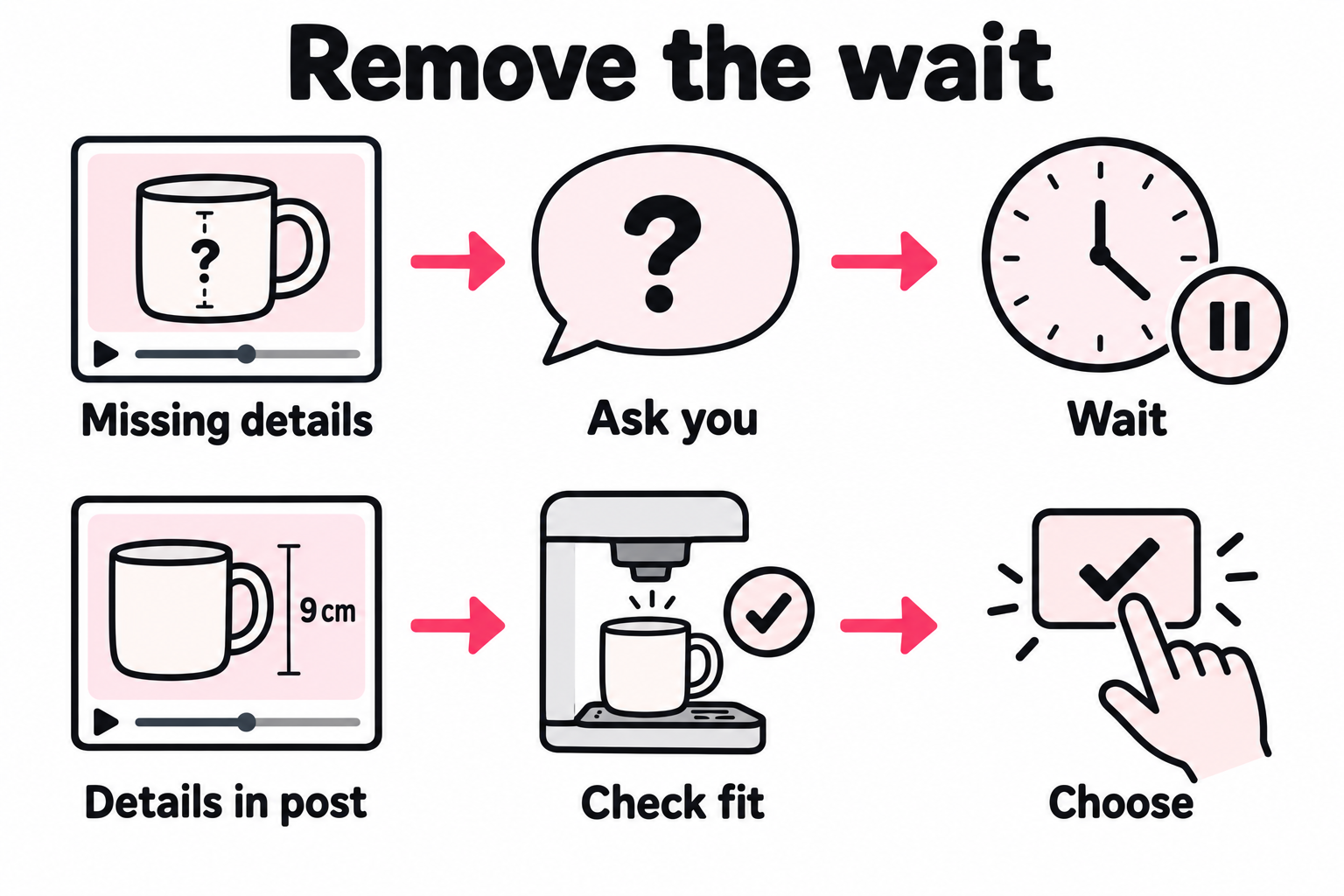
Check the post’s workload before scheduling it
Ask three questions:
- What will people still need to ask? Fill predictable gaps in the video, caption, or linked page.
- What have I promised to do next? A DM, quote, live answer, or followup needs an owner.
- What breaks if I don’t return today? Choose a different CTA or arrange cover if the answer is a lost sale or an unmet promise.
This matters during a launch. Scheduling videos can save upload time while creating a queue of questions nobody is assigned to answer.
TikTok’s creator tools support scheduling and managing posts, though tools vary by account and surface. Use them once the next step works without you.
Keep spoken details clear with TikTok’s caption tools. If the video itself needs work, use our guide to getting more TikTok views for the opening and proof. Spending more time in comments won’t fix a missing demonstration.
How much replying is worth keeping?
Keep replies that resolve a real issue, help someone decide, or teach you something new. Set response times around those needs rather than a fixed daily engagement quota.
A ten minute limit might work on a quiet day and fail during a launch. The better limit is the work you have agreed to cover.
| Type of reply | Priority | What to do with the lesson |
|---|---|---|
| An order problem or wrong claim in your post | Handle promptly | Fix the source of the issue |
| A buying question with clear intent | Answer while the choice is still open | Add missing details to future posts or product pages |
| A thoughtful objection | Give a useful answer | Save the objection and the proof needed to address it |
| A repeated basic question | Use an accurate saved answer | Remove the need to ask it next time |
| General praise | Reply as time allows | Keep room for the relationships you value |
Track repeat questions, not just reply count. If the same question keeps returning, ask whether your content makes the answer easy to find. Fewer repeated questions can mean a clearer post, even if total comments fall.
That is different from losing thoughtful replies from people you want to hear from. Read a sample before deciding that lower comment volume is good or bad.
Use TikTok’s comment settings for filters and access controls. Turning comments off is a larger change than leaving them open and checking them later. Test those choices separately.
If someone else handles replies, give them clear limits: which facts they can confirm, what they must check with you, and where to send customer issues. Save the decisions that need your voice for you.
How do new viewers find your posts when you stop networking?
Give each new post a planned route to people who might care about it. If comments used to bring those people to your profile, removing that work leaves a gap that better scheduling alone won’t fill.
Publishing and getting discovered are separate jobs. A video can be complete, useful, and ready to watch while still needing a way to reach someone new.
The route could be an email to a relevant list, a partner sharing a useful clip, or paid placements that lead back to the video. Choose it based on where likely viewers spend time and how much work it adds to each upload.
Build the route around the post
Suppose the potter publishes a test showing which mug fits under a coffee machine. A preview outside TikTok can show that same test and send someone straight to the video. They don’t need to find the creator through a comment thread first.
Keep that path short. Match the preview to the destination. A person who taps to see the size test should land on that post, not a profile where they must search for it. The complete answer is already there, so the creator doesn’t have to be online to finish the exchange.
This is the route behind automatic promotion of new TikTok posts: a new public upload is detected, a campaign places it across mobile apps and websites, and interested people can tap through to the original video.
The useful part is that publishing can start the next step. You don’t have to remember to send another link or rebuild the same campaign each time. Viewers arrive through the public post link, so this route doesn’t depend on someone liking or commenting from your account.
Decide the rules once, then review what each post earns
Before using a repeatable launch process, settle these choices:
| Choice | Why it matters when you’re spending less time online |
|---|---|
| Which posts qualify, and which to skip | A routine should cover planned work without promoting an unsuitable or expired offer |
| Who should see them | Location and the promise in the preview need to fit the people the video serves |
| Where each tap leads | Send people to the exact video that answers the preview |
| What each post can spend | A per-post budget and monthly limit keep routine promotion bounded |
| What the report can show | Keep delivered traffic and spend separate from changes in public TikTok numbers |
For a small series, apply the same starting rules to the eligible posts. If you only support the one you already expect to win, you learn less about the others. Keep track of any extra push a post receives.
Then use the reports to improve the next launch. With paid placements, move budget away from sources that bring weak or unsuitable traffic. A cheap tap is only useful if it brings someone who has a reason to watch. Where the evidence ends at the tap, don’t credit that source with a follow you can’t trace.
This gives you a process to improve across posts instead of a new outreach task after every upload. Extra traffic may lead to views, follows, or inquiries; it does not establish that TikTok will widen organic reach.
If you’re about to test less commenting, keep this route steady too. Adding paid reach at the same time would test a new overall plan, rather than the effect of removing comments alone.
How do you test growth without outbound engagement?
Remove one defined habit, keep the rest of the plan steady, and compare both results and time. Set your decision rule before seeing the numbers so one strong or weak post doesn’t choose the answer for you.
1. Name the habit and what must stay steady
For example: “Stop routine comments on other accounts for this batch. Keep replies on my own posts, the same content mix, post count, and paid budget.”
Use a batch large enough to repeat your main formats. If you publish three formats, four attempts at each gives you 12 posts to compare. That’s a planning example, not a claim that 12 posts can prove an effect.
Use the posting frequency guide if you want to test volume. Changing it now would make this test harder to read.
Write your stop rule too. A service business might choose: “Keep the change if it saves two hours a week and we still get at least ten good inquiries. Review it if inquiries fall below ten or buyers wait longer for replies.”
Those figures are examples, not targets to copy. Choose limits from your own recent results and sales needs. If inquiries normally range from five to fifteen, one week at nine tells you very little about the change.
2. Compare posts at the same age
Record each video’s views, follows where shown, and useful inquiries after the same time, such as seven days. Add the minutes spent on the habit you cut and on replies you kept.
You’ll need saved results at that same age for the earlier batch. If you don’t have them, collect a baseline first. Comparing a week-old video with one that’s had months to grow gives the older post an unfair lead.
Use the TikTok analytics guide for the reports. Keep account growth separate from per-post results: an older video may still bring followers this week. If a metric isn’t shown, leave it unknown.
3. Read the result in the context of your goal
Here is a made-up example of two 12-post batches, each checked seven days after each upload. Assume the creator can see follows from each post and kept production and reply work steady.
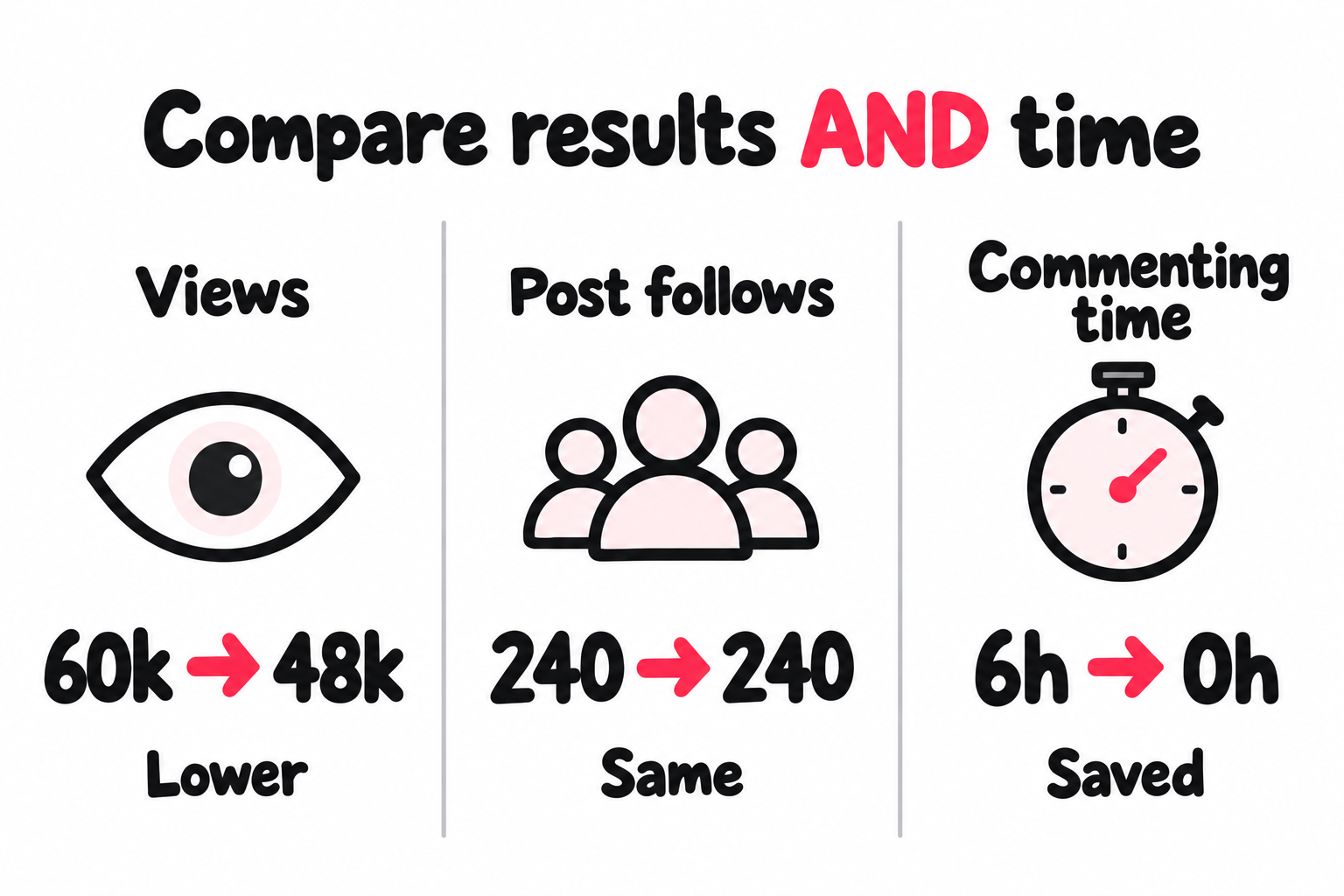
Views fell 20%. Follows from these posts stayed flat. That makes the lighter routine worth a closer look: it saved six hours with no loss on that measure.
Check net account growth over equal calendar periods too. Follows assigned to posts can miss people who found you through a comment or your profile. Older videos can affect the account total, so keep both measures separate.
Follows per 1,000 views rise from four to five. The higher follow rate does not prove the new routine improved conversion. It could reflect a different mix of viewers or topics. And a creator paid for reach may care about the lost views much more.
Look at the posts behind each total. Did one breakout explain most of the gap? Did every format weaken, or only one? Did fewer people ask about buying? Repeat the comparison if one post or one event changes your choice.
TikTok’s creator tips advise giving posts time before judging them. Allow a later check if search brings a large share of your results well after the first week.
4. Test where the saved time should go
First learn whether the lighter routine is workable. Then decide how to use the saved hours: stronger proof in a proven series, faster buyer replies, a new format, or less work overall.
If you change both engagement and production at once, you can still judge the whole new plan. You just can’t claim that less engagement alone caused the result.
What if your views fall after you stop engaging?
Check which part of the result changed before restoring every old habit. Lower views alone don’t tell you that TikTok penalized you for being less active.
- A post has a restriction notice: check For You feed eligibility and the reason given.
- You stopped researching too: check whether the new topics fit the audience as well as the old ones.
- Follows or inquiries fell after replies stopped: check unanswered questions and missed promises before judging outbound comments.
- Only one format fell: compare its topics and execution. A whole-account theory may be the wrong place to start.
If the pattern is broader, use the TikTok growth audit to check reach, viewing, and follows in order. Avoid adding back hours of work before finding the step that needs help.
What should happen after your next upload?
The post should have a way to reach viewers, an answer they can use, and a plan for the questions that still need you. Write those decisions down before cutting the habits that currently fill those roles.
Keep a short note with the video: discovery route, reply owner, review date. If you use paid reach, add the spending limit. That makes the next step clear whether you handle it yourself, delegate it, or use an automatic process.
Then remove one low value habit and check the result. The time you save should come from work that no longer needs your attention, while the useful parts of the process keep running.
Frequently asked questions
Does commenting on other TikToks help you get views?
A useful comment gives someone a reason to check your videos. TikTok does not publish a comment quota that unlocks reach.
When you cut this work, check net account growth and useful inquiries too. Follows assigned to posts may miss people who arrived through a comment.
Does replying to comments on TikTok boost views?
TikTok recommends comments as a way to get to know viewers. Prioritize buying questions, useful objections, and missing details rather than answering every emoji.
If an answer needs footage, make a video reply. Measure it as a new post instead of assuming its success lifted the original video.
Does closing TikTok after posting increase views?
A rise or drop after you leave does not show that leaving caused it. The same applies when you reopen the app.
Stay available when your post promises a reply. Otherwise, review results at a set post age and check any eligibility notice before blaming your time online.
How long should you engage on TikTok before and after posting?
The 15 minutes before and after rule is creator advice, not a published TikTok requirement. Keep replies to your own audience separate from that routine.
Test removing one habit while keeping your formats, post count, and paid spend steady. Compare results and time saved across several similar videos.
Do you need to warm up a TikTok account before posting?
Browsing can shape your feed and help you research a niche. That does not prove it makes your uploads eligible for reach.
If a post gets no reach, check its visibility and any review or eligibility notice. More scrolling is not a documented fix for a restriction.