
TikTok Creator Search Insights: Find Video Ideas People Already Want
Use TikTok Creator Search Insights to vet content gaps, plan stronger videos, and measure search traffic against your time and growth goals.
On this page
TikTok Creator Search Insights: find demand worth serving
You can fill a content gap and still attract people who will never want your next post.
TikTok Creator Search Insights shows search topics, possible gaps in video coverage, and how your posts perform in search. If you already post often, choosing a new topic means spending time you could use on proven content.
What makes a gap worth your time?
You need three things: the right viewer, an answer you can improve, and a reason the result matters to your account. A high popularity score tells you none of those on its own.
What You’ll Learn
- Tell a shortage of videos from a shortage of useful answers.
- Choose between topics that attract buyers, peers, or casual viewers.
- Test a search idea against your own posts without giving the tool credit for every gain.
- Use later search traffic and time spent to decide whether to repeat an idea.
Use TikTok Creator Search Insights without overreading the data
TikTok defines content gaps as searched topics with relatively few videos. You still need to watch those videos to judge whether the answers are poor.
| What you see | What to investigate | What remains unknown |
|---|---|---|
| Content gap | Which part of the question is still hard to answer? | Whether your version would add enough value |
| Searches by followers | Does this fit why people follow you? | Whether it attracts the new audience you want |
| High popularity | Are these searchers useful to your account? | How many will watch your video or act on it |
| Fast topic growth | What event or need is driving the rise? | How much demand will remain when you publish |
A large percentage rise can start from a small base. Unless the tool shows that base and the period, you can’t turn the percentage into a reliable audience size.
Match the life of the topic to the cost of filming. A fast response to a new feature may be worth making with a screen recording. A full day of filming needs a stronger reason than a short spike.
Some topic suggestions come from AI. TikTok warns that they can be wrong. Verify claims inside a suggested phrase before building a video around them.
Audit the answers before committing to a content gap
Open the topic’s related videos, then check the phrase in regular TikTok search. Start with five relevant results. Add a few recent posts if those first results are old.
Five results won’t show every answer, and different viewers may see different results. Use the sample to find what other creators leave out. It won’t tell you your exact rank.
Record what you saw while it still matters
Keep one note with the exact topic, date, active filter, numbers and periods shown, and links to the videos you reviewed. Add your proposed answer below it.
That note helps when a topic changes before you post. It also stops you from rewriting the reason for a test after seeing the outcome.
Read the comments for questions the videos leave open. TikTok’s comment insights can help find common themes where available. Check the replies before trusting a summary.
Look for a specific kind of missing answer
| Gap you find | What a stronger video adds | When to pass |
|---|---|---|
| Missing step | The part people must see to repeat the result | The leading videos already show it clearly |
| Missing constraint | An answer for a real limit, such as a small space or basic tools | The limit is too rare to fit your audience |
| Missing proof | Your test, result, comparison, or real example | You would repeat the same claim without evidence |
| Outdated answer | The changed step, with the old advice explained | You can’t confirm what changed |
Count useful answers, not just videos. Ten clips repeating one vague tip can leave room for a strong demonstration. Two clear, current answers may leave you with little to add.
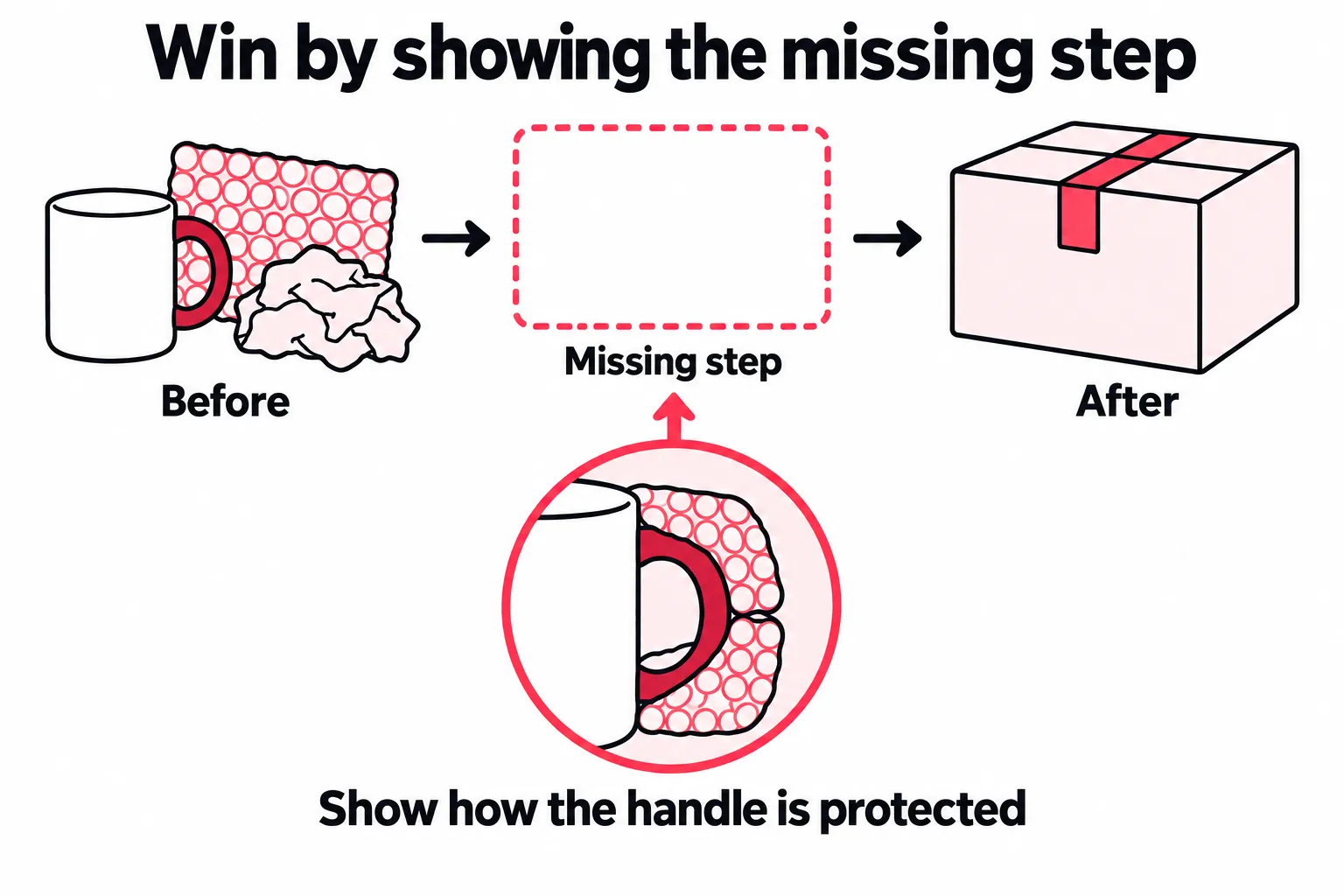
A low view count on an existing answer does not prove the answer is weak. Watch the content. A big view count doesn’t prove search sent those viewers either.
The gap may exist because the missing proof is costly to get. Filming how you pack a mug is cheap; proving a method survives delivery takes testing. Price the evidence you need before committing to the claim.
Finish the audit with this line:
“The current answers show ___, but this viewer still needs ___. I can show it with ___.”If the last blank is “a better hook,” you’re testing how you present the answer. That may be worth doing, but it differs from showing a step other creators left out.
Choose the right audience within the same topic
Take a pottery creator planning a mug packing video. The examples below are made-up briefs.
Two searches can involve the same mug and box while serving very different people:
| Possible search | Likely need to check | Useful video | Result that matters |
|---|---|---|---|
| How to pack a ceramic mug for shipping | A seller wants a method to copy | Show handle protection, materials, and box fit | Interest in more lessons or a maker resource |
| How are handmade mugs packaged as gifts? | A buyer wants to know what arrives | Show the actual unboxing, gift note, and packaging | Product questions or visits to the shop |
If the goal is sales, comments from other sellers may lead to shop talk without bringing orders. If the goal is teaching, those same questions can give you material for the next lesson. Our coaching promotion example shows how a coach can turn them into a series.
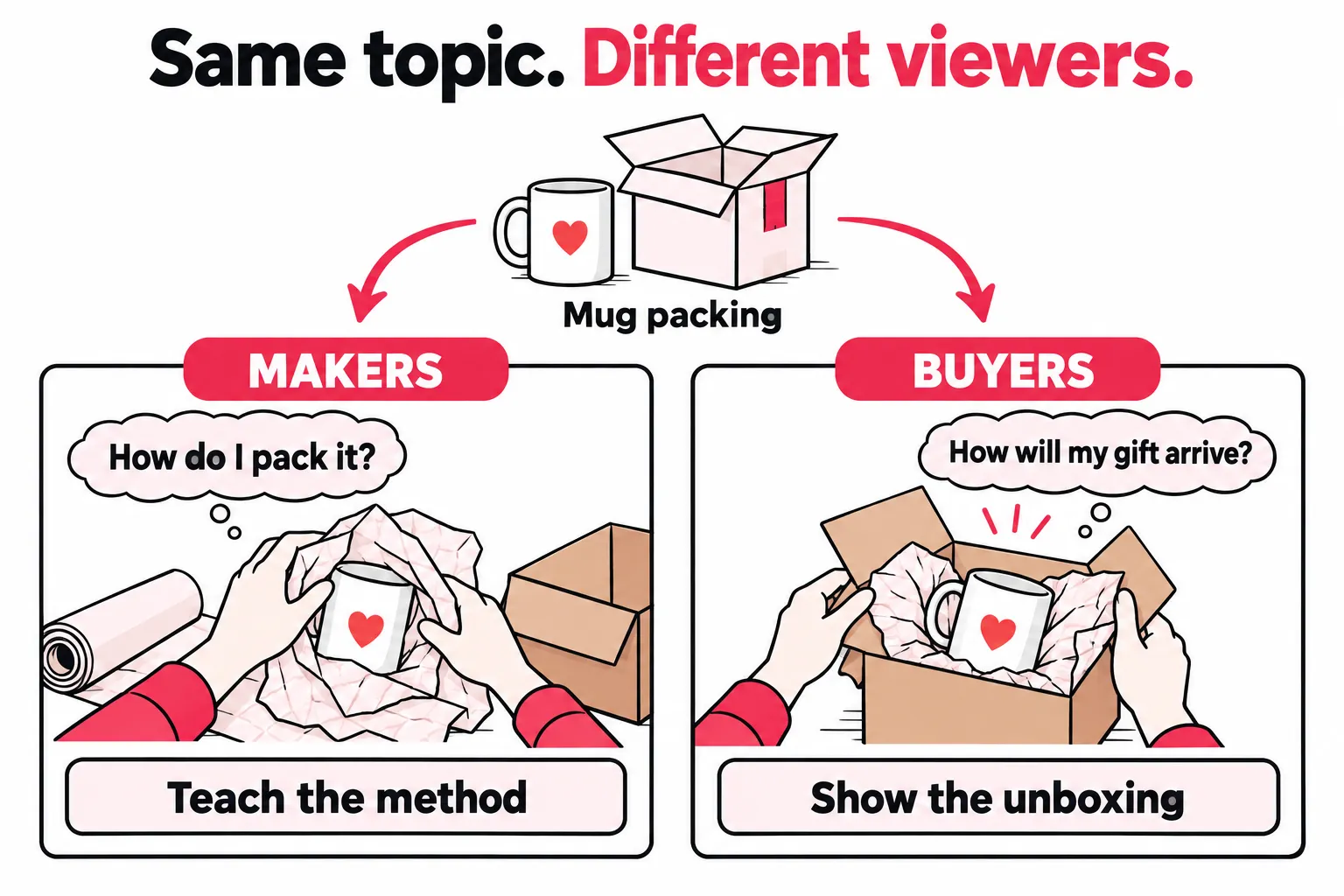
Don’t judge the whole audience from a handful of comments. Check whether follows, shop visits, or inquiries support what you think you’re seeing, where you can measure them.
For a shop, the right choice may be to skip the seller tutorial even if it earns strong search traffic. Research the buyer question on its own. Changing the ending to a sales pitch won’t change what people came to learn.
Commit to the test
- The viewer fits a clear account goal
- You can name the missing answer
- You have proof or access others lack
- The work fits the likely life of the topic
Save it or pass
- Popularity is the only reason to choose it
- It pulls you away from the audience you want
- You would add words but no new evidence
- You need costly work for a brief trend
If the topic fits but the phrase is unclear, use the TikTok keyword research guide to find and compare phrases across sources.
Build a brief around the evidence you can show
For the seller focused mug video, the missing answer might be how the handle sits inside the padding. Keep the brief tied to that gap.
| Decision | Example brief |
|---|---|
| Exact question | How do I protect this mug’s handle while packing? |
| What other answers miss | The camera cuts before showing the padding around the handle |
| What I can add | Close views of the packing before each layer is covered |
| Claim the video supports | How I pack this mug, with the materials and box shown |
| Claim it does not support | A promise that this method prevents all shipping damage |
| Effort limit | Film during the next packing session using the setup already in place |
| Reason to repeat | Useful search traffic plus interest in more packing lessons |
The missing detail needs a close view of the handle. Plan that shot before spending half a day filming a full packing tutorial.
Make the problem clear inside the video itself. Someone who finds it through a share or another app won’t have the search phrase as context. Showing the exposed mug handle before the packing step gives that viewer a reason to care too.
Show enough context for the proof to mean something. A packing test without the box size or materials is hard to apply. A product comparison that hides the settings can make the wrong choice look better.
TikTok’s recommendation guide describes how matching the search query matters in Search. Keep the question and answer aligned as you edit. A strong opening that promises a different result can attract the wrong viewer.
Return to the saved topic and use Create or the video button shown. Keep its phrase and the finished post link together. If you edit in another app, check the upload options after opening Create.
Treat any AI outline as a rough draft. You still need your own test, footage, or experience to fill the gap you found.
Test content gap ideas against your own results
“Does Creator Search Insights work?” is too broad to guide the next upload. Test a claim you can learn from:
“Showing the packing step other videos omit will earn useful search views after the first week.”
This test method is our suggestion. TikTok doesn’t require it.
Choose the comparison before you publish
Pick several recent posts with a similar audience, purpose, format, and length. Six is a workable starting set if you have them. Use their median search views at a fixed post age as a reference, so one huge hit doesn’t set the bar.
If you haven’t saved those figures, start now. A 30 day total and a seven day total don’t make a fair comparison. Don’t invent a baseline from missing data.
Don’t compare all Inspired posts with all other posts as a test of the tool. Those groups can differ in topic, age, format, and effort. The label alone doesn’t make them fair comparison groups.
For the next three suitable topics, keep the format and filming effort close. Apply the same gap audit to each. Look for a pattern across the three.
Choose the main result and one condition for keeping the idea. For a teaching account, that could be later search views plus questions that fit your next lesson. For a shop, it might be later search views plus product interest you can track.
A post can meet the traffic goal and fail the audience goal.Write down what counts as the right audience before you see the view count.
A product question below a video doesn’t tell you whether that person arrived through search. Record search views and product questions, but don’t assume the same people account for both.
Keep paid support out of the comparison
For the clearest first test, leave these posts unpromoted through your chosen review window. If they receive paid support, log when it began and compare them separately.
Different topics, viewers, and posting days still affect results. Keeping the format and paid support steady narrows the possible reasons for a change, though you still won’t have a controlled experiment.
Read Creator Search Insights analytics for the next decision
Open Analytics in CSI. All posts covers search performance across your posts. Inspired posts groups posts made from topics found through the tool.
Use the post’s analytics in TikTok Studio alongside those reports. Check dates and metric labels before combining numbers. Available fields can vary.
Measure what arrives after the launch
Save cumulative search views at the same post ages, such as day seven and day 28. These are the totals since publication. Subtract the first total from the second to find the views added between checks.
Example numbers:
| Post | Search views by day 7 | By day 28 | Added in days 8 to 28 | Work hours |
|---|---|---|---|---|
| A: broad packing overview | 700 | 820 | 120 | 3 |
| B: close view of handle packing | 240 | 1,080 | 840 | 1.5 |
A led at the first check. B then added 840 search views while A added 120, with half the production time. Based on these figures, the focused answer is worth another test.
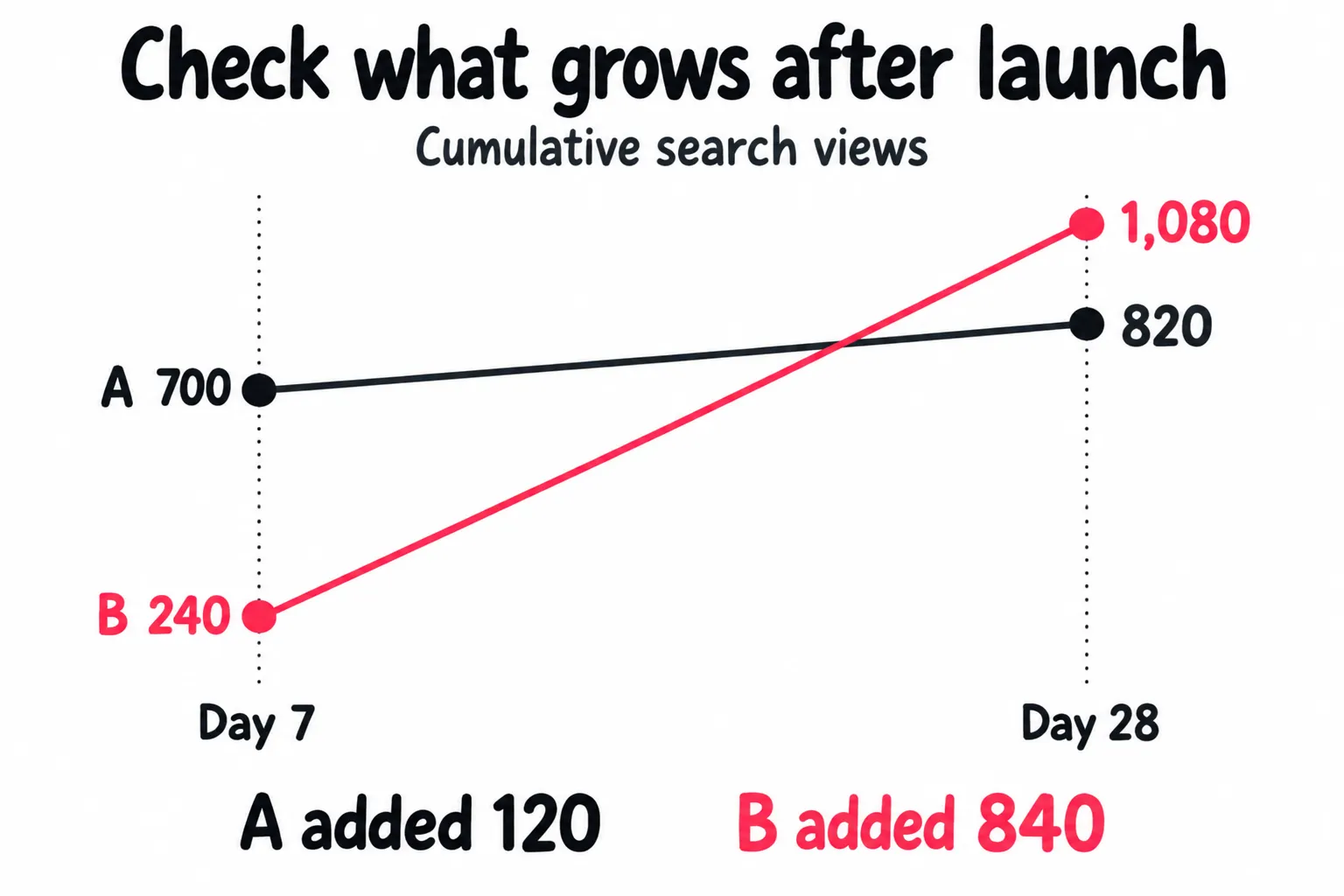
Later search views per work hour are 40 for A and 560 for B. Use that comparison to decide where to spend filming time. Check sales, follows, or questions separately; the ratio doesn’t measure them.
Use matching view windows and include prep and editing in the time log. If you reuse footage, note how long it took to make. Keep total work hours beside the ratio.
Separate search growth from a change in traffic mix
A higher search percentage can come from fewer For You views.The share rises even if search traffic stays flat.
Record search views and total views, not just the share. Where only a percentage is shown, total views × search share gives a rough estimate if both fields cover the same dates. Prefer the reported search count when available.
To estimate growth between checks, calculate the search count at each check first, then subtract. Don’t subtract the two percentages and apply that change to one view total. The totals may have changed too.
Public profile data can’t replace this record. A review of your goals and public activity adds context, but your private search stats need to come from TikTok.
Decide whether to repeat, revise, or stop
| Pattern across similar posts | Decision now | What would change it |
|---|---|---|
| Later search views grow and the audience fits | Test a related unanswered question | Later growth stalls and useful responses fade |
| Search grows but the audience wants something else | Stop expanding that topic for this goal | Evidence those viewers want what you sell or teach |
| The event driving the topic has passed | Drop planned follow ups for that event | Fresh demand or repeated audience questions |
| Several fair tests bring little search traffic | Pause and review demand, wording, and existing answers | A clearer gap or new evidence you can show |
| One post wins while the others stay flat | Repeat the promising part on another topic | A second result supports the same choice |
Whole post watch time includes viewers from other sources. It does not isolate search viewers. Low search views alone can’t tell you whether demand, ranking, or the answer is the problem.
Choose one plausible cause to test next. Our guide to getting more TikTok views covers the creative side; the views without followers guide covers what happens after someone watches.
Handle missing topics and reporting gaps without losing the test
If a topic returns no results, try a specific problem phrase and regular TikTok search. Empty results are missing data, not proof that nobody wants the answer.
If suggestions seem unrelated, search your niche directly. Personalization settings can affect recommendations. Save the topic and your research note so a changed suggestion list doesn’t erase the reason you chose it.
If Inspired posts is empty, check All posts, selected dates, and the video’s own analytics. Keep the topic and post links. A missing label alone does not show whether the video can receive search traffic.
For a missing or broken tool, follow TikTok’s troubleshooting steps. Report the device, app version, and exact symptom if it persists. When clearing cache, use the Cache control instead of deleting drafts.
Test whether a useful search answer can reach beyond search
Your search results show how the videos perform when people are looking for help. Once several related posts bring relevant questions or follows, test a different audience: people who recognize the problem but haven’t searched for it.
The mug handle video might fit both groups. Keep that test separate from the search test above. Give it its own goal, budget, and review date.
Send new viewers to the answer they were shown
One route is paid placement in mobile apps and sites, with a tap leading to the original TikTok post. This walkthrough of discovery outside TikTok shows the path.
Send the tap to the video you showed. If the preview shows a close view of handle packing, link to that post. If you send people to a profile full of unrelated clips, they have to search again for the answer you offered.
Check the path on your phone before spending. Does the right post open? Is the promised step easy to find? Is there a related answer on the profile for someone who wants more?
Set the launch rules before the next batch
If you only add support when a post feels slow, your tests start at different ages for different reasons. You learn less about which answers travel well.
For the next batch of related answers, set these rules once:
| Rule | What to decide |
|---|---|
| Which posts qualify | Same audience and purpose, with a complete answer worth sending people to |
| When support starts | A consistent point after publication, separate from your organic search review |
| What each post can spend | A limit per video and a cap for the whole batch |
| What gets recorded | Post link, launch time, spend, delivered traffic, and the response you can measure |
You can run this with a checklist. As you add posts, new post detection, spending controls, and separate video reports let you apply those rules without setting up each campaign again. Keep the per video limits and reporting fields consistent.
Read each video’s report next to its TikTok results. Over several launches, you’ll see which sources send people who watch and respond. Shift budget toward those.
Keep search views in their own column so you can see both channels working. Keep the routine running while the videos draw the questions, follows, or product interest you want.
Frequently asked questions
Does Creator Search Insights actually work on TikTok?
It can help you find search demand and gaps worth testing. Choosing a suggested topic does not guarantee a boost. Check whether the resulting videos bring search views and interest in what you sell or teach.
Compare several related posts with your usual content at the same post age. Record search views, work hours, and relevant questions or follows. Look for results you can repeat before changing your approach based on one spike.
What does the Content gap feature mean on TikTok?
Content gap highlights topics people search for that have relatively few videos. The label does not show whether the existing answers are weak or whether your video will rank.
Open the related videos and check what they leave out. A missing step, useful comparison, or outdated answer can give you a reason to make the post. If the question is already well answered and you have nothing to add, pass on the gap.
How do I find content gaps for my niche on TikTok?
Open Creator Search Insights and use Content gap to look for topics tied to your audience. Search specific problems in your niche too, then inspect the related videos and questions people still ask. Save useful topics in Favorites before leaving the tool.
Choose a topic where the viewer fits your goal and you can show a missing answer. If the suggestions are poor, check regular TikTok search and your comments. A high popularity score is not a reason to serve the wrong audience.
Why do my Creator Search Insights videos get fewer views than my normal posts?
You may have chosen a topic for a different audience, or one with less demand than its growth percentage suggests. People may also find your search focused video later than your usual posts. Check those possibilities before concluding that the tool reduced your reach.
Compare similar topics and formats at the same age, with paid support kept separate. Check actual search views as well as total views. If both stay weak across several tests, revisit the question and the answer before blaming the Create button.
Do I need to post through Creator Search Insights or use its hashtag to rank?
TikTok’s public guidance does not state that either is required to rank in search. The Create button is its documented route for making a post from a selected topic. The hashtag is not a documented shortcut to more reach.
Use that route when working from a saved topic, but judge the result through search analytics. A missing Inspired posts entry alone does not show that the video is hidden from search. Check All posts and the video’s own stats too.