How Much Does TikTok Pay per 1,000 Views? Creator Rewards Rates Explained
How much does TikTok pay? Calculate pay per 1,000 views, explain payout drops, and compare video formats by earnings, costs, and the time they take.
On this page
How much does TikTok pay creators?
Your views and RPM can both rise while your TikTok pay falls. Creator Rewards depends on how many views qualify, what those views earn, and any Additional Reward. A higher number on one screen can hide a loss on another.
Know what the next video needs to earn
If you already post often, a broad payout range won’t tell you whether to make another tutorial, spend longer on an edit, or repeat a series. You need to know what changed in your pay and what your next batch can reasonably earn.
This guide focuses on that decision. The examples use Creator Rewards only. Brand fees, gifts, sales, and music royalties belong in separate columns so you can see what each part of your work earns.
What You’ll Learn
- Calculate your pay: per 1,000 qualified views and per 1,000 public views.
- Explain a payout drop: put a dollar amount on each change.
- Forecast a batch: keep one viral hit from setting the budget.
- Price the extra work: find out whether a longer edit can cover its cost.
How much does TikTok pay per 1,000 views?
TikTok has no fixed payment for 1,000 views. If your standard RPM is $0.60, you earn $0.60 in standard rewards for 1,000 qualified views.
RPM is your reward rate for every 1,000 qualified views. You may have seen articles quote $0.40 to $1.00. TikTok doesn’t promise that range. Your rate can be lower or higher.
TikTok’s explanation of how rewards work separates two parts:
- Standard Reward: the amount worked out from your qualified views and RPM.
- Additional Reward: extra pay based on the video’s quality, how it holds attention, and the specific topic or skill it covers.
Before comparing your pay with someone else’s screenshot, look for both amounts. Their total may include a bonus that your video didn’t earn.
Why do older articles quote just a few cents?
Many refer to the old Creator Fund. TikTok’s Creator Fund update says it has been replaced by Creator Rewards.
Check which program a creator was using when they shared their earnings. An old Fund payout won’t tell you what your next Creator Rewards video could earn.
How much does TikTok pay for 100,000 or 1 million views?
At a $0.60 standard RPM, 100,000 qualified views earns $60 and 1 million earns $600. To use your own rate, divide qualified views by 1,000, then multiply by RPM.
The table shows what you’d earn at three example rates, in US dollars. These aren’t averages. Each example assumes your video qualifies and has enough qualified views to start earning.
| Qualified views | At $0.20 RPM | At $0.60 RPM | At $1.00 RPM |
|---|---|---|---|
| 1,000 | $0.20 | $0.60 | $1 |
| 10,000 | $2 | $6 | $10 |
| 100,000 | $20 | $60 | $100 |
| 500,000 | $100 | $300 | $500 |
| 1,000,000 | $200 | $600 | $1,000 |
The figures leave out Additional Rewards and any later changes to your balance.
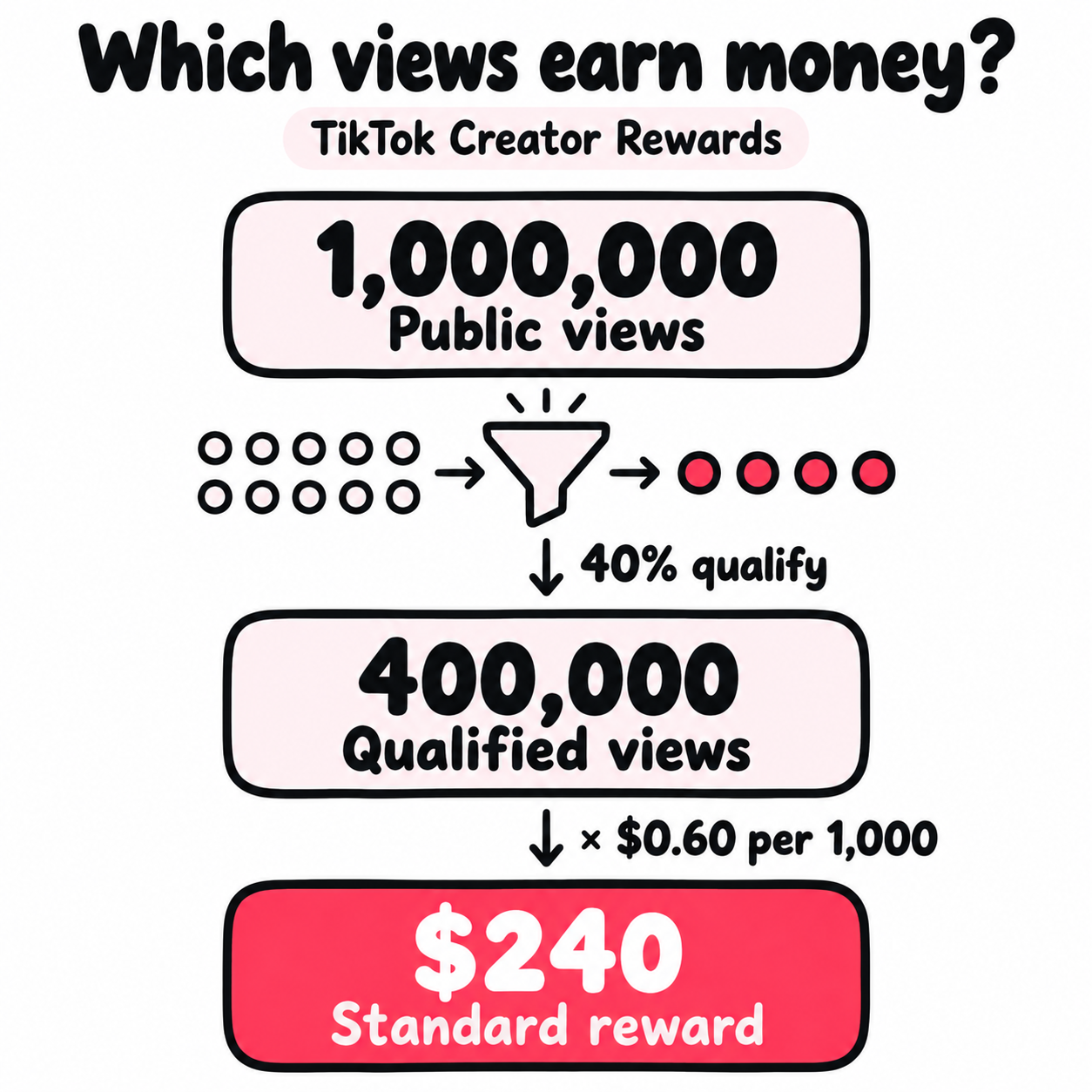
For 1 million public views, the answer changes. If 40% qualify at $0.60 standard RPM, the standard reward is $240. If 70% qualify at that rate, it’s $420. Those shares are examples, not benchmarks.
Who can earn through TikTok Creator Rewards?
You need to be accepted into Creator Rewards, then post videos that meet its rules. The 100,000 views in 30 days is an account entry rule, while the 1,000 qualified views is a per-video earning rule, so keep them separate when checking a $0 payout. Our guide to the TikTok Creator Rewards Program requirements covers who qualifies, the eligible countries, and what to do if you’re rejected.
What counts as a qualified TikTok view?
Qualified views are the views TikTok accepts when it works out your rewards. Its Creator Rewards help page describes unique views from the For You feed, with several types left out:
- Paid and promoted views.
- Fake or fraudulent views.
- Views lasting less than five seconds.
- Views TikTok marks as disliked.
One account watching the same video again still counts once. Use the qualified total in your dashboard. Likes and traffic-source charts don’t give you enough detail to work it out yourself.
The video itself must qualify too. TikTok’s comparison of Creator Rewards and the Creator Fund excludes Duets, Stitches, and sponsored content from qualifying original videos.
For planning, mark each upload Rewards, sponsorship, sales, or audience growth. A short performance clip can be a strong fan-building post without belonging in your Rewards forecast.
How do you calculate your own TikTok earnings?
Divide a video’s standard reward by its qualified views, then multiply by 1,000 to find its standard RPM. Use figures from the same dates and list any bonus on its own.
Open Profile → Menu → TikTok Studio → Creator Rewards Program. TikTok’s Studio guide explains where to find active programs, balances, and rewards analytics.
Build a record you can compare
Use one row per video. Save its format, length, goal, upload date, review date, currency, work hours, and direct costs alongside the figures below. This example covers a video’s first seven days:
| Record | Example only |
|---|---|
| Video and earning period | One video, first seven days |
| Public views for that period | 200,000 |
| Qualified views | 80,000 |
| Standard Reward | $48 |
| Additional Reward | $12 |
| Total estimated rewards | $60 |
Calculate three rates:
- Standard RPM: $48 ÷ 80,000 × 1,000 = $0.60.
- Qualified share: 80,000 ÷ 200,000 × 100 = 40%.
- Total reward per 1,000 public views: $60 ÷ 200,000 × 1,000 = $0.30.
The dashboard rate is $0.60; the full reward works out to $0.30 per 1,000 public views. Use the first to inspect standard pay. Use the second to compare what a video’s full reach earned. Label them so you don’t compare one with the other.
Match the dates, currency, and videos in both reports. Save the figures at the same post age, such as day seven or day 28. Those are review choices, not TikTok rules. Our TikTok analytics guide covers fair comparisons across reports.
Calculate your account rate without distorting it
For a group of videos, add their standard rewards, divide by their combined qualified views, and multiply by 1,000. Don’t take a simple average of their RPMs.
Suppose one video earns $1 from 1,000 qualified views, while another earns $40 from 100,000. Their RPMs are $1.00 and $0.40. Averaging those gives $0.70, but the combined rate is $41 ÷ 101,000 × 1,000 = about $0.406.
The $0.70 average gives the tiny video too much weight. Use totals for the rate, then compare formats separately before choosing what to make next.
Why are your TikTok earnings low or suddenly falling?
Check which number fell: qualified views, standard RPM, or Additional Rewards. Any of the three can cut your pay while your public views keep rising.
| What changed? | Check first | Useful next move |
|---|---|---|
| Public views rose; qualified views barely moved | The same video and dates | Check what share of views qualified |
| Qualified views held; standard pay fell | Standard RPM | Compare who watched and how long they stayed |
| Standard pay held; total pay fell | Additional Reward | Look for a smaller or missing bonus |
| A video shows $0 | Join date and video status | Check the rules and qualified count before reposting |
| Your balance fell after a review | The reason in the notice | Save it and appeal if you think it’s wrong |
A payout drop, explained dollar by dollar
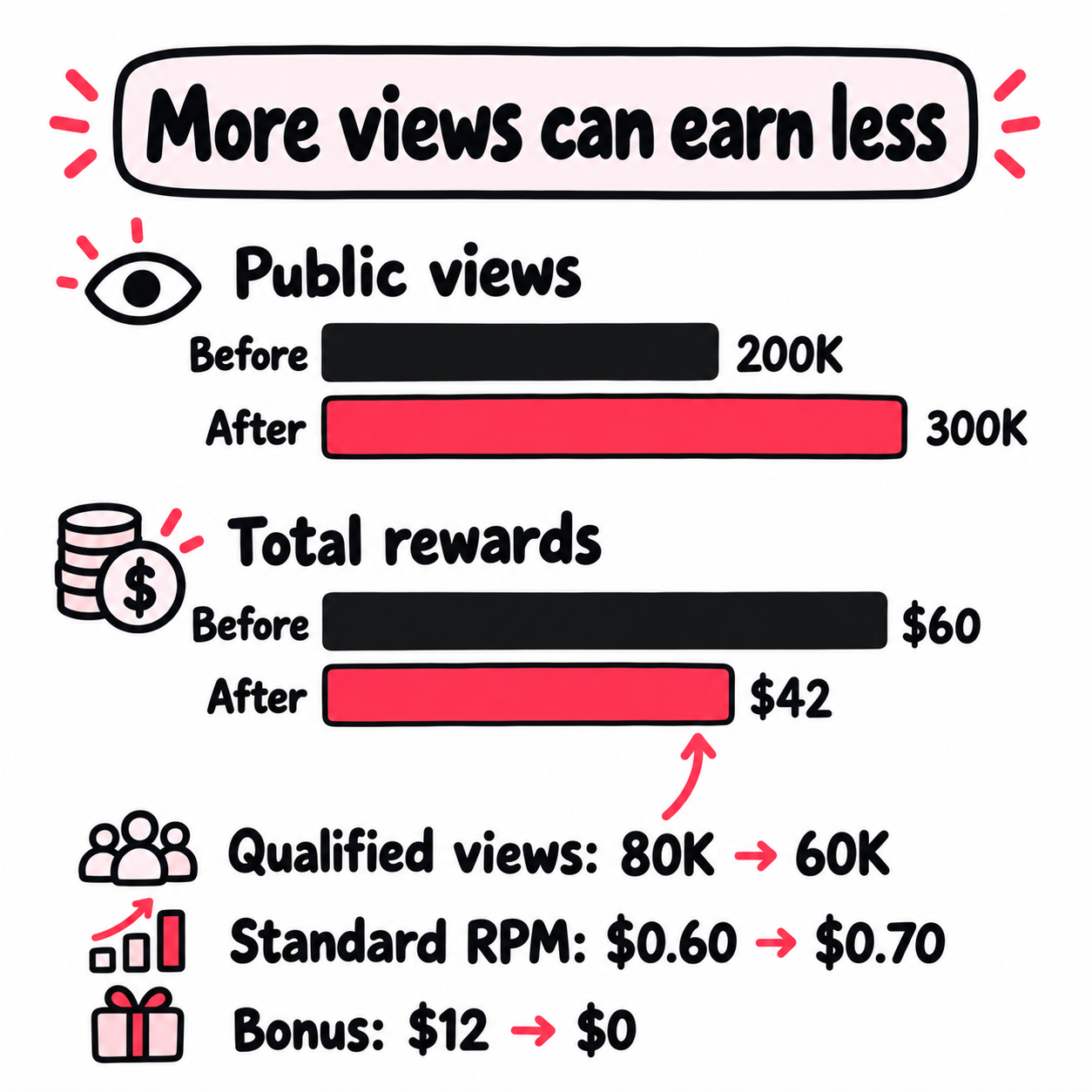
Consider two batches with the same number of similar videos, each measured over its first seven days. These figures are hypothetical:
| Measure | Earlier batch | Later batch |
|---|---|---|
| Public views | 200,000 | 300,000 |
| Share that qualified | 40% | 20% |
| Qualified views | 80,000 | 60,000 |
| Standard RPM | $0.60 | $0.70 |
| Standard rewards | $48 | $42 |
| Additional Rewards | $12 | $0 |
| Total rewards | $60 | $42 |
Public views rose 50%. Standard RPM rose about 17%. Yet total pay fell 30%.
Start with the earlier $60 and change one figure at a time:
- More public views: +$24. At the old 40% share and $0.60 rate, 300,000 views would produce $72 in standard rewards instead of $48.
- A smaller qualified share: −$36. At 20%, standard pay falls from $72 to $36, still using the old rate.
- A higher standard RPM: +$6. The new $0.70 rate lifts that $36 to $42.
- No bonus: −$12. The earlier batch’s extra reward is gone.
$60 + $24 − $36 + $6 − $12 = $42. This is a way to reconcile the money, not proof of what caused each change. Changing the order would shift how much you assign to each step.
The next check is the qualified share and bonus feedback. Compare post eligibility, traffic sources, viewer locations, and watch time. Those can give you leads; they don’t reveal TikTok’s hidden formula. Chasing a higher standard RPM would miss the largest losses in this example.
Give support enough detail to check the problem
Save the video link, upload date, date you joined, qualified count, reward amounts, and full notice. Note when you last checked. Hide private payment details if you share screenshots outside support.
You could write: “I posted this video after joining Creator Rewards. It shows 4,800 qualified views but still has $0 in rewards. Is it waiting for review, or does it fail one of the rules?”
If a video was disqualified, use the appeal option in its notice and check the deadline. For other account issues, TikTok has an in-app helpdesk and feedback route.
How do you forecast TikTok income you can plan around?
Base the forecast on recent posts you can repeat, including the ones that earned nothing. Keep a separate line for bonuses and a separate allowance for older videos that still earn.
Use a complete batch, not your best screenshots
Review your last 10 to 20 posts made to earn Creator Rewards, if you have that many. Group similar formats and compare them at the same age. The sample size is a starting point, not a claim that the forecast is reliable.
- Include $0 outcomes from failed or low-performing Rewards posts.
- Put unknown or still-pending rewards in a separate group. Missing data isn’t $0.
- Keep sponsored posts and short fan-building clips out of the Rewards group.
- Use the middle standard payout per post as one planning case. Show a weaker case too.
For each case, use a real post or batch with its own results. Multiplying your best view count by your best qualified share and best RPM can create a result no video has achieved.
Put the posting plan beside the earning history
Suppose you plan 12 videos. Each takes two hours and costs $3 in cash. These are example standard payouts, with no bonus assumed:
| Planning case | Standard pay per post | Pay for 12 posts | After $36 in cash costs |
|---|---|---|---|
| Weaker results | $7 | $84 | $48 |
| Middle results | $18 | $216 | $180 |
| Stronger results | $30 | $360 | $324 |
At the middle case, $180 over 24 work hours leaves $7.50 per hour to pay you, before tax and other business costs. You can judge that against your own time target, other income, and fan growth.
Also check how much one hit carries the total. If $160 of a $240 month came from one video, the rest earned $80. Show both totals before committing to a monthly cost. Keep the hit in your records; don’t assume it repeats on schedule.
When is a longer video or extra editing worth it?
Extra work is worth it when the added return covers the time and money it takes, or serves another clear goal. Compare the extra cost with the extra reward, rather than the video’s whole payout.
TikTok’s explanation of its rewards formula names originality, play duration, search value, engagement, and ad value. It does not promise a set rate for a niche.
Give viewers a reason to watch the full answer
A musician teaching a chord change could play the phrase first, slow down the tricky move, then play it in the song. Viewers hear what they’re learning before they spend time on the lesson.
Pick a question you can answer by showing the work. “How do I change chords without a gap?” gives you a clear lesson to film. Our Creator Search Insights guide helps you find questions people search for.
Search value can affect rewards. Still, check what the video earned in your dashboard rather than putting a dollar value on each search view.
Set the hurdle before you add production time
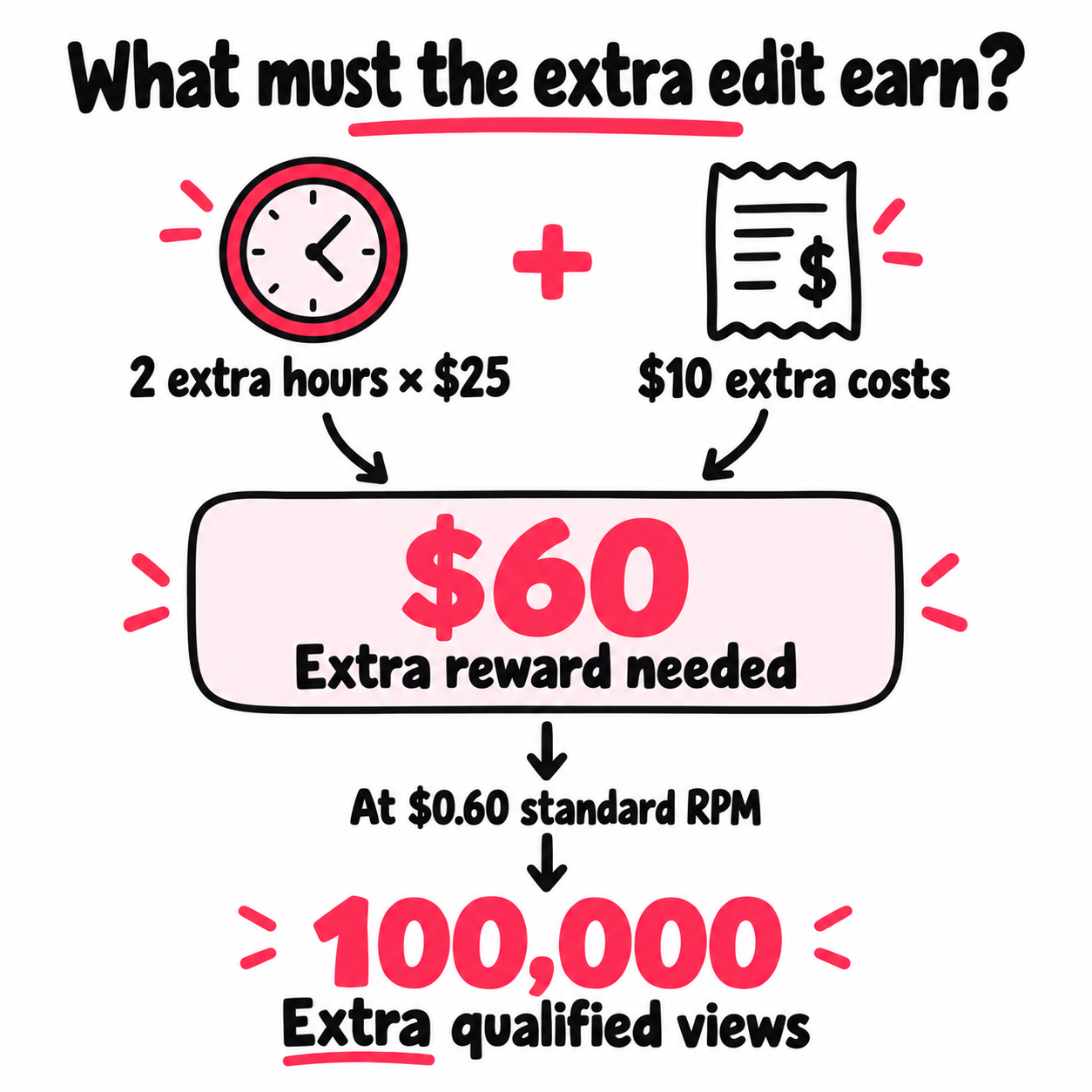
Suppose a more detailed edit takes two extra hours. You value that time at $25 an hour and need $10 of extra materials. The edit needs to add $60 to cover your chosen time target and cash cost.
At an unchanged $0.60 standard RPM, that means 100,000 extra qualified views. With a 40% qualified share, it would need 250,000 extra public views. Neither result is promised; this gives you a hurdle to compare with past videos before spending the time.
If the edit’s likely benefit is sales or fan growth, measure that benefit too. A $60 lift in total rewards isn’t necessary when another clear return justifies the work.
Test the format without changing the whole account
Try a few matched pairs from the same series: one with your normal edit, one with the added detail. Keep the topic, audience, and review age as close as possible. Log any paid support and compare it separately.
For each version, track standard rewards, bonuses, direct costs, work hours, and the fan action you wanted. A longer post can earn more while leaving less per hour. Several pairs give you a better basis for a choice than one breakout; they still won’t prove the edit caused the result.
Reasons to repeat the extra work
- Added rewards cover the added cost
- The result holds across several similar posts
- The format fits the audience you want
- Fan growth or sales justify the effort when rewards do not
Reasons to test again before scaling
- One bonus accounts for most of the gain
- The longer edit lowers earnings per work hour
- A different audience or paid push clouds the comparison
- Only the RPM improved while total rewards fell
When does TikTok pay your Creator Rewards?
TikTok’s help says monthly payments are processed on the 15th, once you meet the payment rules. Estimated rewards usually show up about one to three days after views. Seeing an estimate doesn’t mean a payment has been sent.
Your payout screen shows the minimum balance, payment method, and setup steps for your account. These can vary by country, and the money may take time to reach you after it’s sent.
Before reporting a missing payment, check three items:
- Status: estimated, available, processing, or paid.
- Setup: payment account linked and any requested details filled in.
- Transaction: amount, currency, date, and reference number.
Keep three amounts in your records: estimated rewards, the final statement, and the cash received. Match the earning month and currency, then check any listed fees or adjustments. This keeps a reporting change from looking like a missing transfer.
For a payment query, send the transaction reference, expected amount, received amount, and dates. Don’t book an estimated balance as cash you already have.
How does Creator Rewards fit with your other income?
Creator Rewards can sit alongside brand fees, sales, and the work you do to build an audience. Decide what each video is meant to help you earn or grow before judging its result. Our guide to every way to make money on TikTok shows when you qualify for each one.
If you also go LIVE, gifts are a separate line with their own math. Our guide to what TikTok gifts are worth to creators shows what viewers pay and what reaches you.
Product links pay differently. In the TikTok Shop affiliate program, the seller sets a commission on each sale, and it settles after the order is delivered. Views alone earn nothing there.
For a sponsored video, agree on the fee and what you’ll deliver to the brand. TikTok’s TikTok One overview explains its tools for that work. Don’t add an expected Creator Rewards payout to the deal; sponsored videos don’t qualify.
Commercial posts also need suitable audio. Check TikTok’s commercial music guidance before using a track to promote a product or partner.
For a fan-building post, choose a result you can track: follows, full-song visits, lesson inquiries, or another useful next step. Avoid assigning a cash value to each new follower without evidence from your own business. Our TikTok profile assessment helps you review the audience goal and public activity around that plan.
Give a proven series a repeatable way to reach new people
Suppose your lessons already bring follows and questions about the next part. Before adding another hour to each edit, consider whether that hour would do more for the series by helping new viewers find it.
Plan the next batch’s reach before you post it. For four new lessons, write down:
- Who should find them: the audience and country that fit your work.
- What comes after the view: a pinned first lesson, the full song, or a clear next part.
- What you will spend: a limit for each post and the whole batch, including time spent setting up campaigns.
There are ways to find that audience beyond the For You feed. Ads across mobile apps and websites can send interested people straight to a public TikTok video. The viewer arrives at the work itself, where they can watch, respond, and explore the series.
For a recurring series, the useful part is making that process repeatable. Connect the launch to the new post, with rules you’ve already chosen: which uploads to include, the country, the spend limit, and when to skip one. That lets the plan follow your real posting pace.
A system that finds new posts and runs their promotion can take over those repeated steps once the rules are clear. You still choose what deserves support and what result would make it worth repeating.
Make each launch teach you something
Ask for a separate report for each promoted post, showing spend and delivered traffic. Put it beside the video’s watch time, audience response, and growth over the same dates. Keep qualified reward views in their own column.
Across a few launches, you can see which posts draw a useful response and which traffic sources deserve more budget. A single larger view count gives you far less to work with.
If one lesson draws questions and interest in the next part, use that evidence in the next brief. If viewers arrive but leave before the lesson starts, check the opening before adding spend. That review works whether you run campaigns yourself or use managed promotion for a creator series.
The result you’re looking for is a series you can keep making, a repeatable route to new viewers, and enough detail to decide where the next dollar goes.
Frequently asked questions
Does TikTok really pay $1,000 for 1 million views?
It can, but $1,000 isn't a fixed rate. One million qualified views at a $1.00 standard RPM would earn $1,000 in standard rewards. At $0.60 RPM, the same qualified views would earn $600.
One million public views may include far fewer qualified views. Use your rewards dashboard's count and rate, then add any Additional Reward that isn't already included.
Why are my qualified TikTok views much lower than my total views?
Only views that pass the program's rules count for rewards. Repeat plays from one account count once, while views under five seconds, paid views, and other excluded traffic don't qualify.
Compare the same video and dates, and check when each report last updated. Read any view-exclusion details shown in your dashboard. Don't assume that half your views should qualify or that a gap means TikTok lost them.
Why does Creator Rewards show $0 even though I have qualified views?
Qualified views alone don't confirm a payable reward. Check that the video has at least 1,000 qualified views, was posted after you joined, and still meets the program's rules. Also look for a review notice.
TikTok says estimated rewards normally appear one to three days after views. If an eligible video's figures stay at $0 beyond that usual window, send support its link, dates, qualified count, and screenshots.
Why did my TikTok RPM drop or my Additional Rewards disappear?
A lower standard rate and a smaller bonus are different changes. First check whether the RPM you're comparing includes Additional Rewards. A lost bonus can lower a combined rate even when the standard rate holds steady.
Compare standard rewards, qualified views, and bonuses for the same dates. Check the video's reward feedback and eligibility notices. A drop alone doesn't prove an account penalty or tell you which content change would fix it.
When does TikTok pay Creator Rewards, and why is my payment missing?
TikTok's help says payments are processed on the 15th of the following month when you meet the payment rules. The minimum balance, payment setup, and time needed for the money to arrive depend on your account and region.
Check whether the amount is estimated, available, processing, or paid. If it's marked paid, use the transaction reference to trace it with your payment provider. If it hasn't been sent, check setup requests and account notices before reporting it missing.