Your first payment is covered
Your complete initial plan payment is returned, including promotion already delivered.
You post. We promote.
You have products people need to see in action. TokPromo promotes every new product video while it is fresh, sending new shoppers to it while TikTok is still deciding how far to push it. Show what makes your products useful while we handle the promotion.
Get your products noticed
You know the size, the features, and what comes in the box. A shopper looking at one photo may not. A short demo can show them what a picture leaves out.
Show them what the product does. TokPromo helps more people see it. Your new videos get their own ads while you get back to running the shop.
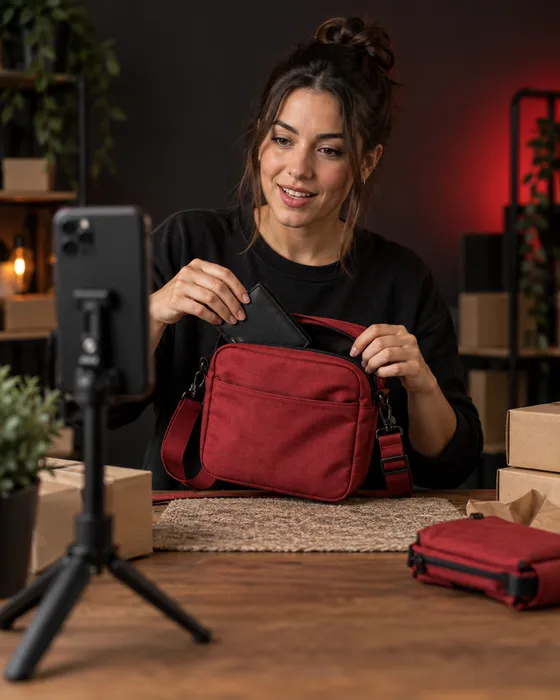
Let people see the bag being packed, the shirt on a person, or the kitchen tool doing its job. Promotion gives each new demo more chances to reach someone who has never visited your store.
Will it fit? How big is it? What comes in the box? Give each question its own video. People can see the details that help them decide whether the product is right for them.
You have orders to pack, stock to check, and customers to help. TokPromo finds your new posts and runs the ads, so finishing a video does not leave you with another campaign to set up.
Automatic promotion
Post a demo on your public TikTok account. TokPromo detects it while it is fresh, runs its ads, and sends new shoppers to watch. Their views and reactions give TikTok more reasons to show the video to a bigger audience. Your plan covers the number of new videos you choose each month.
You don’t share your TikTok password or build a new campaign after every upload.
Publish a product video
Show one useful thing about the item. Post through TikTok as usual, and TokPromo checks for the new upload.
We run its ads
After approval, ads appear across mobile apps and websites in your chosen country. Pick a country you can ship to.
People open your TikTok post
A tap on the ad takes a viewer to your original video. They can watch the demo, ask a question, and visit your profile.
You see what the ads delivered
Your report is ready as soon as promotion finishes. TokPromo uses each campaign’s results to favor the apps and sites that bring the most interested viewers, then repeats the process for your next eligible video.
The first stop is your TikTok video. If someone wants to shop, make the next step clear in the clip and on your profile. Where your account supports a store link, point it to the product you just showed.
You choose the country, post count, and budget per post. You can pause or skip a video before its promotion starts. That lets you leave out a personal update or a product that is not ready to sell.
Give people a reason to want it
“Our new bag is here” tells people you have something to sell. “Here is everything that fits in this small bag” gives them a reason to watch.
Start with the question someone might ask in a shop. Then use the video to answer it.
Swipe across to read the full table.
| Product | A weak opening | Show this instead | Why it helps |
|---|---|---|---|
| Crossbody bag | “Meet your new everyday essential.” | “Phone, wallet, keys, glasses. Here is what fits.” Pack the bag and close the zip. | People can compare it with what they carry. |
| Garlic press | “You need this kitchen gadget.” | Press a clove, open the tool, and rinse it. Start with “Here is the part I always check: cleaning it.” | Buyers see the job and the cleanup before choosing. |
| Oversized shirt | “The perfect fit for everyone.” | “I’m wearing a medium. Here is the sleeve and length.” Show the shirt from the front and side, with your height on screen. | Shoppers have real size details to compare with their own clothes. |
Keep the proof in the frame. If you say the bag holds a large phone, show that phone going in. If an item does not fit, say so. A clear limit helps someone choose and can prevent a wrong purchase.
TikTok’s own creative advice recommends an early opening that grabs attention, a clear product benefit, and a clear next step. You can do that with a phone, good light, and your own voice.
Before posting, watch once without sound. Can you still see what changed or how the item works? Add short captions for the details people need. Keep the product name and key measurements clear of TikTok’s buttons. For help tightening the opening, see our advice on getting more views on TikTok.
One product. Ten useful videos.
Here is a made up example: Noor runs a small online bag shop. She wants more people to discover one compact crossbody bag. She can post two or three times a week between packing orders.
She uses the same product across ten new videos. Each answers a different buying question. TokPromo handles the ads for the posts in her plan.
Before filming, Noor picks a bag that is in stock and ready to ship. She checks its measurements, strap length, price, and delivery details. Her profile uses the same shop name as her website. Its store link opens the bag’s product page.
She pins a packing demo and a size check so a new visitor can find both. Then she films most of the clips in one session. She keeps one slot open for a real customer question.
Show whether the bag can replace a bigger one for a short trip.
“This is what I take when I leave the big bag at home.” Lay out a phone, small wallet, keys, and glasses. Pack them, then close the zip.
Next step: Point to the exact bag through the store link on her profile.
Help viewers judge its size and where it sits.
“Here is the same bag with the strap short and long.” Show both from the front and side. Put the strap range and the wearer’s height on screen.
Next step: Ask viewers to check the measurements on the product page.
Answer a question that a product photo leaves open.
“Will a big phone fit with its case still on?” Name the phone model and show it going in. Leave the whole test in the clip, including closing the pocket.
Next step: Ask which phone size people want to see next.
Show how a pocket helps during a normal day.
“I keep my keys here so I don’t have to tip everything out.” Film opening the right pocket and taking the keys out in one shot.
Next step: Point to the packing demo pinned on the profile.
Help someone choose a color with a clearer view than a tiny swatch.
“Red or black? Here are both by the same window.” Move each bag in the same light. Show the fabric close up without adding a color filter.
Next step: Send interested viewers to the available colors on the product page.
Clear up a doubt that other shoppers may share.
Choose a real question from the comments or a support message, with private details removed. For “Does the strap come off?”, show both clips and take it off.
Next step: Ask what else they want to see before choosing.
Show what is included in the price.
“Here is what arrives when you order this bag.” Open a sample parcel and lay out the bag, strap, and care card. Name any item shown that costs extra.
Next step: Point to current delivery details on the product page.
Help viewers decide if this is the right size for their day.
“Phone and keys fit. My tablet does not.” Show both tests. Explain that this size is for light trips, so people know what they are choosing.
Next step: Ask them to compare the bag’s inside measurements with what they carry.
Help someone picture when they would use the bag.
“What I pack for a coffee run and a walk.” Start with the packed bag, show it being worn, and show where the phone goes when she pays.
Next step: Invite viewers to save the packing idea or find the bag on her profile.
Make the jump from watching to shopping easy to follow.
“Looking for the red bag from the packing video?” Hold it up, show its product name, and briefly show the matching page in the store.
Next step: Point to the store link on her profile and the color selector on that page.
Noor does not need ten different products or ten new discounts. She needs ten useful things to show. If nobody leaves a question, she can use one from an earlier customer conversation and say where it came from.
The order helps Noor plan, but each clip stands on its own. Someone may see the color check first and the packing demo later. Name the product in every video and give that viewer a clear next step.
That plan covers the ads, campaign setup, management, and reports. Noor still films and posts the videos. If your store can finish four videos a month, choose four. Count the posts you can make before choosing your allowance.
From watching to shopping
A viewer wants the red bag you just packed. They should not have to search through twenty products to find it.
Make the name, color, and next step match from your video to your store. Every extra guess is another chance for someone to leave.
Name it in the video
Show the product name and say what to do next. “See the sizes through the link on our profile” gives a viewer a clear reason to tap.
Make the profile feel like the same shop
Use the same store name, show what you sell, and pin useful product videos. Check the store link your account lets you add.
Open the right product page
Match the item, color, and price people saw. Put size, stock, shipping costs, and delivery details where a phone user can find them.
Check the path on your phone
Start at the TikTok profile and follow the link. Can you choose an option and see the full cost without getting lost or meeting a broken page?
If your account cannot add a website link, show the shop and product name clearly. Do not say “link in bio” when there is no link. Use the options actually available on your account.
For a launch, check stock and links before the first video goes out. If you mention a sale, include its end date and keep the product page current.
Keep your best products in view
You do not need a launch every week. A product you have sold for a year can still be new to the person watching.
Give it a new demo, a new use, or an answer to a question. TokPromo can promote the new video as part of your regular plan.
The pouch you filmed holding makeup might also hold cables. Show what fits and how you use it. Give people a useful new video about a product you already have in stock.
Read returns notes and support messages. If people keep asking about sleeve length or cleaning, film that answer. Remove names and order details before using a customer message.
Keep a phone stand, one sample, and a short shot list near your packing table. Film a few clips together. Our post planning guide can help you choose a pace that fits the work in your store.
Need help choosing what to film each week? Use our TikTok content planning guide to turn those product questions into a schedule.
See what leads people closer to buying
TokPromo shows spend, reach, and traffic for every promoted video. Check watch time in TikTok’s analytics where available. Check carts, orders, and returns in your store.
A question about size or shipping tells you what to film or fix next.
Swipe across to read the full table.
| What you notice | What to check | What to try next |
|---|---|---|
| Viewers leave before the product test | How long the intro takes | Start with the packed bag or the tool doing its job. |
| People ask where to buy | The product name, profile, and store link | Point to one clear place and check that the link works. |
| People reach the product page but do not add to cart | Price, size details, photos, and stock | Show the missing detail in the next video and on the page. |
| People add to cart but leave | Shipping cost, delivery time, payment options, and errors | Check checkout on a phone and show costs before the last step. |
| Orders arrive, but returns mention size | What the video and product page showed | Add measurements and a size comparison people can judge. |
Compare posts at the same age, such as a week after publishing. Note which had promotion and what else was running. A discount email or another ad campaign may have brought orders too.
If your store supports campaign tags, add them to your TikTok profile link and check the visits and orders it records. Line that up with your TokPromo reports to see which demos drive store visits, then make more of those.
In Noor’s example, the monthly promotion costs $250. Suppose she keeps $20 from each order after the product, packaging, payment fees, shipping she covers, and expected returns. She would need 13 extra orders at that amount to cover the promotion cost alone. Other business costs still need to be paid.
Run the same math with your own costs to set a budget you are comfortable with. If visitors cannot find the product or finish checkout, fix that first so more of your promoted traffic turns into orders.
TokPromo fits a store that keeps making useful TikTok videos and wants their promotion handled. Your demos, replies, and new product clips each get their own promotion within your plan.
For a campaign that sends people straight to a website, TikTok offers website visit and conversion goals in Promote. You can use a separate sales campaign alongside your regular TokPromo plan. Keep both within one spending limit.
See our TokPromo and TikTok Promote comparison for how the two fit together. Then choose a plan for the new product videos you want more people to see.
Build your plan
Choose how many videos you want promoted each month and the budget behind each one. Your monthly price updates instantly, with the mobile ad budget, automation, quality control, and reporting included.
days
Full purchase protectionUnconditional guarantee
Every new TokPromo plan includes an unconditional 14 day guarantee. If you decide it is not the right fit, contact support within 14 days of your purchase and your full initial plan payment is returned.
Your complete initial plan payment is returned, including promotion already delivered.
Views, followers, engagement, and campaign results never change the terms.
The same unconditional 14 day guarantee applies to every new plan and budget.
Start with confidence
Here’s how it works, what you control, and what to expect after you post.
Talk to the TokPromo teamOur ads send people to your public TikTok video, where your demo does the selling. From there, they can visit your profile and use your store link if your account has one. Make the exact product easy to find and show viewers where to go.
Yes. TokPromo promotes your public TikTok posts, so it does not need to connect to your store platform. Keep your shop running as usual. We only need your public TikTok handle, never your TikTok or store password.
No. You need a public TikTok account and videos that are approved for promotion. Your products can be sold on your own website. If you also use TikTok Shop, you still manage its listings and sales tools separately.
Yes. Ads can introduce people to your videos before you have a large following. Add a few clear product demos and fill in your profile first. Someone who has never heard of your store should be able to see what you sell, what it does, and how to find it.
Every promoted video puts your product in front of new shoppers while the post is fresh, and interested viewers can go from your profile to your store. Clear demos, a fair price, and an easy checkout turn those visits into orders. Your TokPromo reports show what each video delivered, and your store reports show the orders. Your first payment is also covered by our unconditional 14 day guarantee.
Skip that video before its promotion starts, or pause promotion from your account. If a promoted item sells out while its campaign runs, update the product page and your TikTok information, add any restock date, and contact support if you want help with the campaign.
Promotion starts automatically once TokPromo finds the post and the ad is approved, so post launch videos a little ahead of the big day. Build the launch around several useful videos so each one gets its own push. For a short sale, make sure the price and dates in the video will still be right when people see it.
No. Choose a monthly post count you can keep up with while running your store. Film a demo, a size check, and an answer to a customer question in one session, then publish them over the week. TokPromo finds each eligible new post until you reach your plan’s monthly limit.
Yes. Use TokPromo to get more people watching your demos and product answers. Keep campaigns aimed at store visits or purchases for those jobs. Set one total budget and decide how much goes to each service. Note which campaigns were running when you review your store results.
Every new plan has our unconditional 14 day guarantee. Contact us within 14 calendar days of your first purchase for a full refund of that payment, including promotion already delivered. There is no sales target you need to meet. Plans renew monthly, and you can cancel future renewal from your account.
Keep learning
Practical guides to help you plan your videos and turn new viewers into followers.
Recommended
Show the result sooner and make each video easier to follow.
Read moreRecommended
Choose what to film and use the response to plan your next videos.
Read moreRecommended
See how automatic post promotion fits alongside native TikTok campaigns.
Read moreReady for more viewers?
Choose how many videos to promote each month and the budget behind each one. Ads, setup, and reports are included in your price.
Build Your PlanNot sure where to start? Take the 1 minute quiz