
How to Get a Spark Ads Code on TikTok (and What to Agree Before You Share It)
Get your TikTok Spark Ads code, compare fee and commission offers, and set clear usage terms. Includes a launch checklist, sharing template, and fixes.
On this page
TikTok Spark Ads code: what should you know first?
A brand asking for your TikTok Spark Ads code is asking to advertise with your post and your name.
The quick answer
In your video’s menu, open Ad settings → Ad authorization. Generate the code, choose the agreed period, and copy it.
The harder part is deciding whether the request is worth accepting. A working code proves access, not payment, the right product link, or an agreed stop date.
This guide is for creators sharing a post with a brand or agency, including sponsored content and TikTok Shop affiliate videos. If you’re running the ads, use the handoff and launch checks to confirm what the creator has approved.
What You’ll Learn
- Generate the code and confirm the advertiser can use it.
- Turn a broad request into a clear offer you can price.
- Compare a fixed fee with a commission deal.
- Check the launch, fix errors, and close or renew the campaign.
How do you get a TikTok Spark Ads code?
Generate the code in the TikTok app from the post the brand wants to use. Log into the account that owns it:
- Open the agreed video, tap the three dots, then Ad settings.
- Read and accept the terms if you agree. Enable Ad authorization.
- Generate the code and select the agreed authorization period.
- Tap Copy Code and send the full text with the post URL.
- Have the advertiser confirm the right post loads and its permission dates cover the campaign.
These steps follow TikTok’s creator authorization instructions. Labels can vary between app versions.
For several videos, pair each full code with its post URL and handle. Keep the symbols intact. A screenshot or video URL alone does not replace the code.
What does sharing a Spark Ads code allow?
A Spark Ads code lets an advertiser use a specific TikTok post in an ad. The code doesn’t settle the rest of your deal.
The ad appears under your name. Paid views, likes, and comments can add to the original post, as explained in TikTok’s Spark Ads overview.
The code does not enforce every term in your deal. The advertiser chooses the audience, budget, schedule, and link. Confirm those separately from your fee and permissions.
“TikTok only, one product, two countries” needs both an agreement and matching campaign settings. An edited version for Instagram is another request to review.
Check these limits before authorizing
TikTok’s Spark Ads creation guide says the caption cannot be edited after authorization. Privacy settings are also restricted during promotion. Finish the caption and disclosure first.
Decide who answers comments and product complaints. If someone asks about a late order under your video, you need a person at the brand who can help.
How long should your Spark Ads authorization last?
Choose the shortest available period that covers the agreed campaign, then check the actual dates shown. TikTok lists 7, 30, 60, and 365 days. A longer option should match a longer agreement.
Write down both when the brand may run ads and when the platform authorization ends. Don’t calculate expiry from the day you send the code. Ask the advertiser for a screenshot of the authorization dates shown after import.
Choose one timing rule in your agreement:
- Fixed dates: June 3 through June 16. If launch moves to June 10, the stop date stays June 16 unless you agree otherwise.
- Time from first use: 30 days from the first ad delivery, with a latest launch date of June 10. Ask for proof of the first delivery and the resulting stop date. If launch misses the deadline, review the dates again before use.
The latest launch date stops a “30-day deal” from remaining open for an unknown future campaign. The platform permission still needs to cover the actual ad schedule.
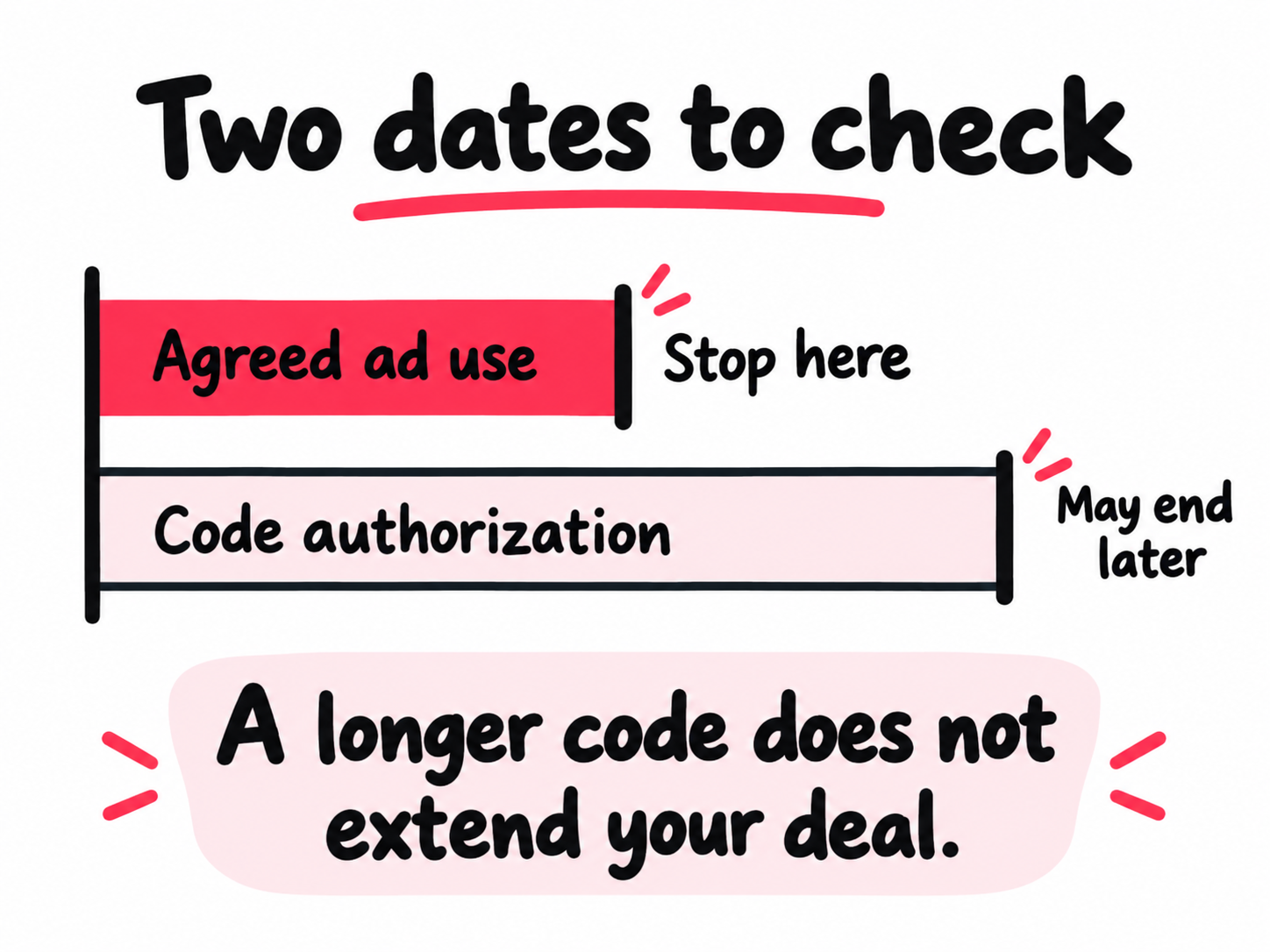
If the brand asks for 365 days for a short test, ask what later use it needs. Offer the shorter campaign first, or price the longer request with its limits stated. Save the agreed dates, time zone, platform expiry, and renewal contact beside the post URL.
Set a renewal reminder before the agreed stop date, not just the platform expiry.
What should you agree before sharing your code?
Separate the work you make, the ads the brand can run, and the other work you may have to turn down. Then price the actual request, not a vague promise of exposure.
Turn a broad request into an offer you can compare
Suppose a skincare brand asks for “one product demo, a 365-day code, and no competing brands.” This example counteroffer separates what you make from what it can do with the video. Use it to discuss terms, not as a standard rate or contract.
| Part of the offer | Example terms to agree |
|---|---|
| Create the video | One finished video and one round of agreed corrections. State the fee, approval deadline, and payment date. |
| Run it as an ad | The named post, product, brand and ad account; TikTok only; named countries; 30 agreed days; approved landing link. State the fee for this use. |
| Limit other brand work | No exclusivity included. If requested, list the competing brands or product category, dates, and separate fee. |
| Renew | Written agreement on the next dates, use, and fee before the current period ends. No assumption that sending the code approves future campaigns. |
If your existing contract already includes these rights, start there. Don’t charge again for something you’ve already agreed to provide.
Use the offer to make a decision:
- Accept when the defined use fits your fee, schedule, and existing brand commitments.
- Narrow it when you like the deal but not its reach: offer a 30-day TikTok test instead of a year across several platforms.
- Decline when a required term is unacceptable, such as exclusivity that blocks more valuable work and the brand won’t narrow it.
If one likely competing job would pay more than the added exclusivity fee, put that tradeoff beside the offer. You don’t need an industry rate card to spot that cost.
Confirm the destination if you earn commission
For a TikTok Shop affiliate post, check the product permission and the commission rate separately. A working ad can still send shoppers through a route that doesn’t earn you what you expected.
In the post’s Ad settings, look for Affiliate product change authorization. TikTok says turning it off limits ads to the original linked products. Turning it on allows other products and may make orders ineligible for commission. The setting is only for affiliate-linked posts and isn’t available to everyone yet. See TikTok’s product-change permission guide.
Save that setting, then request the ad preview, product ID, applicable commission rate, and the report where your credited sales appear. If you don’t have the setting, get the product confirmed before launch.
TikTok’s affiliate creative commission FAQ bases commission on qualifying sales under its affiliate rules. A separate Shop Ads rate may apply; don’t assume your usual rate applies to ads. Confirm returns, deductions, and payout timing too.
A post without an affiliate product link doesn’t directly earn Shop affiliate commission on ad sales. A fee or separate off-platform commission deal needs its own terms and tracking.
Ad spend and total reported sales don’t establish your commission. Check the amount credited to you.
Compare a fixed fee with commission using payable orders
For the same product demo, rights, and dates, consider this hypothetical choice. The filming fee is equal in both offers:
- Offer A: $200 fixed fee to run the post as an ad.
- Offer B: 10% of each credited order with a $40 commissionable value, or $4 per payable order.
Offer B needs $200 ÷ $4 = 50 payable orders to match Offer A. If 60 orders come in but 12 don’t qualify after returns and other exclusions, you earn 48 × $4 = $192.
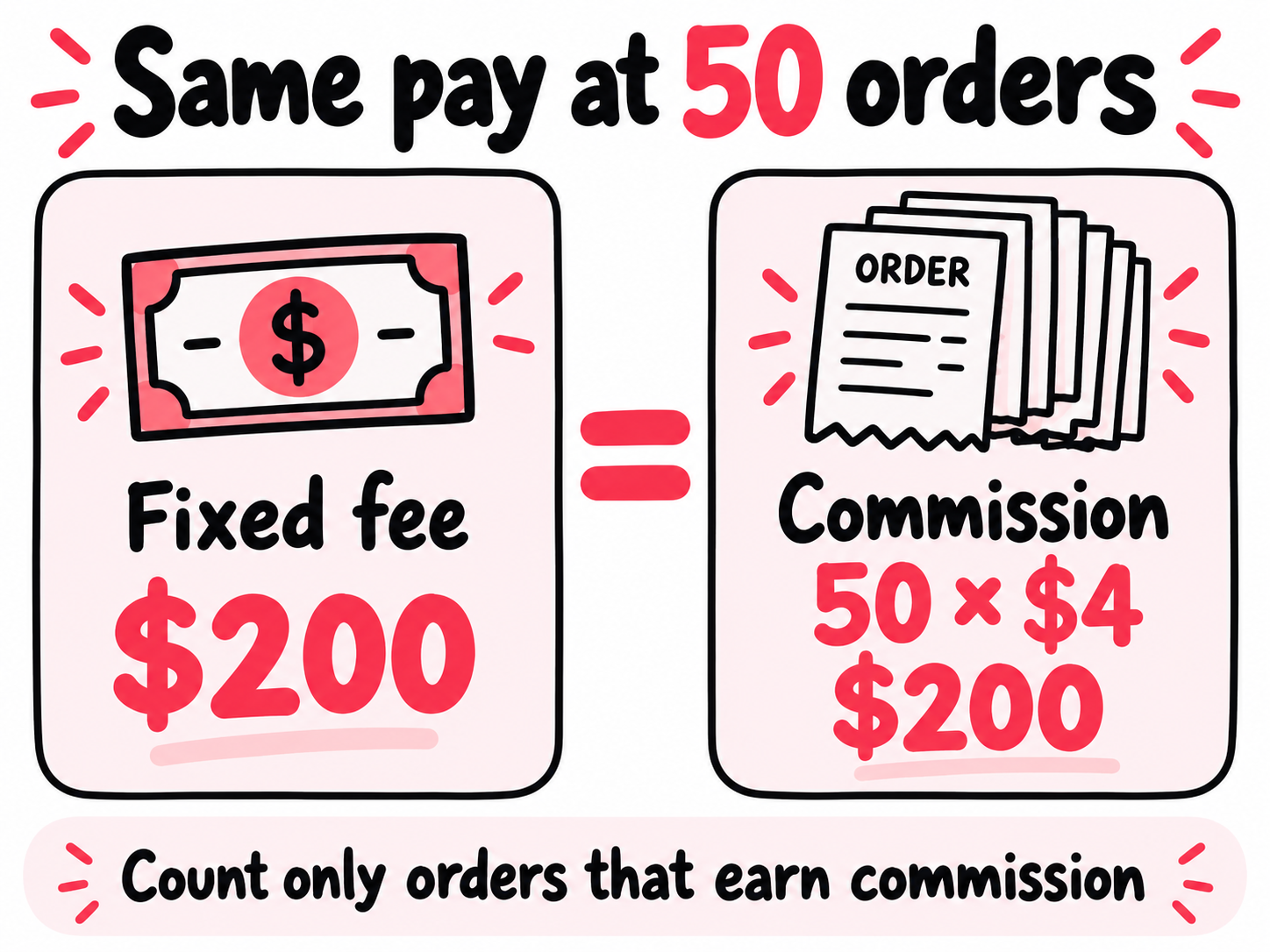
These are example inputs, not recommended rates or a sales forecast. Use the value on which commission is actually paid, after any agreed deductions. Compare payment timing too. If you can’t check credited orders, the upside is unproven; ask for a fixed minimum, reporting access, or different terms.
Clear music and disclosure before launch
Check that the music is cleared for the ads the brand plans to run. TikTok says its licenses outside the Commercial Music Library do not cover commercial use. For other music, follow its commercial music guidance and get the needed permissions.
For music outside that library, confirm permission covers both the recording and the composition, plus any samples. Save the approvals with the campaign brief. An “original sound” label alone doesn’t clear the music for ads. That applies even when the sound came with a video you filmed yourself.
TikTok also requires its content disclosure setting for commercial posts. When you tag a brand partner, look closely at any options to let it run ads or add links. Check each one before turning it on.
For endorsements affecting US consumers, the FTC’s influencer disclosure guide calls for a clear, visible disclosure of the brand relationship. Free products can count too. Put the disclosure where viewers will notice it.
If the brand also asks you to switch account types, check the TikTok Business vs Personal account tradeoffs before changing your setup.
What should you send with your Spark Ads code?
Send the full code, post URL, and agreed dates, then ask the brand to check that the right video loads. Keep the details in one message so nobody has to piece them together.
Before sharing, agree in writing that the advertiser will wait for your final sign-off. The code itself does not make them wait. Then send the details:
Hi [name], here’s the Spark Ads code for [post URL], posted by [handle].
Code: [paste the full code]
Agreed use: [brand/product], TikTok Spark Ads in [countries], from [start] to [end and time zone].
Payment: [agreed fee or commission terms and payment date].
Destination: [approved landing page or product link].
Please check that the right post loads, the authorization covers these dates, and the ad links to the page we agreed on. As agreed, send the preview and wait for my final sign-off before launch. Let me know before the campaign ends if you’d like to run it longer or use it elsewhere.
For the person running the ad: in Ads Manager, open the ad’s creative selector, choose TikTok posts → Add post, and enter the code. Check the video and authorization dates. Menu names vary by campaign type.
What counts as ready to launch?
Ask for these four checks from the person operating the ad account. Give the agreed final sign-off only when all four match the deal.
| Check | Evidence to keep |
|---|---|
| Correct post and advertiser | Post URL and handle in the preview; brand, agency, and ad account ID. These identify the use you’re approving. |
| Correct dates | Authorization expiry screenshot and campaign schedule covering the agreed dates and time zone. |
| Correct destination | Tap the preview link. Check the product or landing page, plus product ID and commission setup when relevant. |
| Payment and reporting | Agreed fee or applicable rate, payment date, and who sends the campaign or commission report. |
Save starting post counts and the check time. Our TikTok analytics guide explains which reports to compare later.
Why is your TikTok Spark Ads code not working?
Get the exact error message before generating another code. A typo, expired permission, and missing advertiser access need different fixes.
Use TikTok’s official Spark Ads code errors to match the problem:
| Error or symptom | Who acts and what to check |
|---|---|
| Incorrect code or format | Creator: recopy the full code. Advertiser: remove extra spaces from the paste. |
| Code deleted | Creator: generate a new code if the agreed use still applies. |
| Authorization expired | Both: agree an extension before the creator extends access. |
| Ad ends after authorization | Advertiser: correct campaign dates, or request an agreed extension. |
| Post not public | Creator: review visibility and approve any change. |
| Video deleted or unavailable | Both: select an eligible post and update the brief. |
| Unsupported format | Advertiser: check the format. Stories and duet carousels are unsupported. |
| Missing ad permission | Advertiser: have its account manager check access. |
| Processing error | Advertiser: refresh or retry later. |
If it still fails, ask the advertiser for the exact error and ad account ID. Send support those details with the post URL, authorization dates, and time it failed. Say what you’ve already tried so they don’t send you back through the same steps.
A working code doesn’t mean the ad will pass review. Check the full notice if the next step fails.
How do you extend or stop Spark Ads permission?
Agree any extension first, and work with the advertiser to remove permission when you’re done. You may need them to remove the ads before you can delete the code.
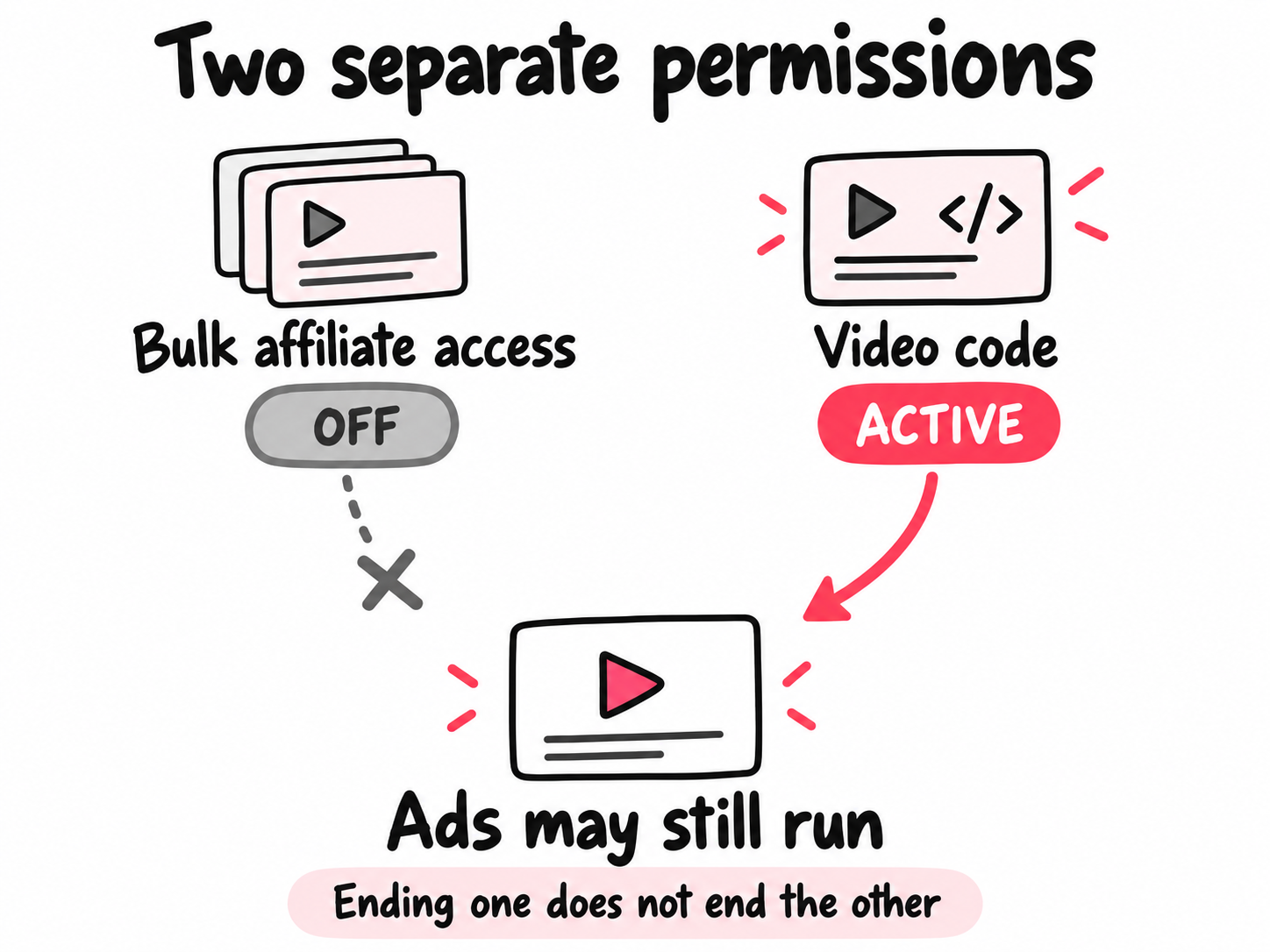
TikTok requires all ads using a code to be deleted in Ads Manager before that code can be deleted. Pausing delivery and deleting those ads are different actions.
For a renewal, have the agency confirm the same post, ad account, product, link, countries, and platforms. Review any change before approving the fee and dates. Ask for the previous period’s delivery or commission report so the next decision uses results you can check.
For Shop affiliate content, check how permission was granted. TikTok says bulk affiliate authorization and individual video-code authorization are independent. Turning one off doesn’t cancel the other. Code-authorized Shop ads can continue until code expiry even if the affiliate collaboration or organic product link ends.
To close the campaign:
- Ask your brand contact to stop the ads on the agreed date.
- If removing the code, ask them to delete all ads using it.
- Check the post code and any separate affiliate authorization; remove the permissions that need to end.
- Save written confirmation and the final report.
When you show these results to another brand, note that the post ran as an ad. Our TikTok engagement rate guide shows how to compare it with posts that didn’t.
How can you build on the extra attention?
Decide how your next uploads will reach new people before the brand campaign ends. A sponsored product demo may send shoppers to the brand’s checkout. A useful tutorial, review, or behind-the-scenes post needs a route that brings viewers to your own content.
Review your recent public posts with the TikTok profile analyzer, then choose what you’ll publish next. If you want paid support for those uploads, settle three limits:
- Country: where you want the next viewers to come from.
- Budget per post: how much each eligible upload can spend.
- Monthly post cap: how many uploads can receive that support.
Those choices let you assess a process as well as a price. Does it notice new posts, start each campaign within your limits, and give you a report for each video?
One approach is automatically finding and promoting new TikTok uploads. It starts with your public handle, checks for eligible posts, and launches a separate campaign after ad approval. Ads in mobile apps and websites give interested viewers a route to your original TikTok post. Check that your content and music rights cover those ads.
This removes the repeated job of sending each new link and rebuilding its campaign. Keep the per-video delivery reports beside the response on TikTok. Compare posts with similar topics, formats, and goals before changing the budget, and keep reported visits separate from public view growth. You can then judge both the work saved and what the traffic did.
Frequently asked questions
How do I get a Spark Ads code on TikTok?
Open the video in the TikTok app, tap the three dots, then Ad settings. Enable Ad authorization, generate the code, choose the agreed period, and tap Copy Code.
Send the full post code privately to the agreed advertiser. This is different from your login verification code, which you should not share.
Do creators get paid for TikTok Spark Ads?
Creators can earn a fee or commission, but sending a code doesn't itself pay you.
Your fee and payment date follow your brand agreement or program terms. A 365-day authorization doesn't set your payday. For Shop commission, check which sales qualify and which rate applies to ads. Don't assume all reported sales earn commission.
How long does a TikTok Spark Ads code last?
TikTok offers authorization periods of 7, 30, 60, or 365 days. Ask the advertiser to confirm the actual dates shown in Ads Manager after importing the code.
Don't assume the timer starts when you send it. Your agreed campaign stop date can be earlier than the platform expiry; have the advertiser set the schedule accordingly.
Why is my TikTok Spark Ads code not working?
Match the exact error to the fix before generating another code.
Check whether permission already expired or ends before the planned ad does. Verify the full code and post too. The advertiser must fix missing ad-account permissions.
Missing Ad settings or Copy Code? Send support the post URL, app version, device, and a screenshot.
Can I stop a brand using my Spark Ads code before it expires?
Ask the advertiser to stop the ads and coordinate removal. Don't assume you can delete an active code yourself.
TikTok requires all ads using the code to be deleted in Ads Manager before the code can be deleted. Check any separate bulk affiliate authorization too: turning off one permission doesn't cancel the other.