TikTok Promote Not Delivering: Fix It, Appeal It, or Get Unused Funds Back
TikTok Promote not delivering? Find the cause, check your payment, appeal a rejection, and track unused funds with a clear step-by-step checklist.
On this page
Why is TikTok Promote not delivering?
Before you spend more, find out where the last order stopped. TikTok Promote can fail at payment, review, or ad delivery. An active order can also spend slowly, while a report can lag behind what happened.
Find the cause without rebuilding the campaign
Changing the video, audience, goal, and budget at once leaves you with another order and no clear answer. Use the failed order and your last working one to narrow down what changed. Then decide whether to wait, appeal, fix the setup, or run a small test.
This guide covers paid orders in TikTok Promote. For a drop in unpaid reach across your posts, use our TikTok views dropping guide.
What You’ll Learn
- Use status and spend to find which part failed.
- Compare orders without blaming the wrong change.
- Choose a test that answers one useful question.
- Handle partial delivery, payment errors, and unused funds.
- Give support a case they can investigate.
What does your order status actually tell you?
Read the status together with the reason and spend. The label tells you where to look; it rarely explains the whole cause.
Open Profile → menu → TikTok Studio or Business suite → Promote, then the order details.
| Evidence in the order | What it tells you | What to check next |
|---|---|---|
| Unpaid or payment failed | You haven’t confirmed a funded order | Match the charge or receipt to the order ID |
| Pending review | Approval is still unresolved | Time since successful payment |
| Rejected, with a reason | That order has a review blocker | The named rule and the content it refers to |
| Partially delivering | The order needs a closer look | Status of each video, plus total spend |
| Active, spend unchanged | The report shows no new spend in that interval | Dates, remaining budget, notices, and a second check |
| Active, spend and views rising | Some delivery is taking place | Pace, audience, and results for the chosen goal |
An old spend total doesn’t prove the campaign is still running. A $6 total may mean it spent $6 this morning and then stopped. You need two checks to see what’s happening now.
For a multi-video pack, record each video’s status. If three posts run and two fail review, the pack’s total cannot tell you how much each post received. Use per-video figures where available; don’t split the total equally by guesswork.
Has delivery stopped, or is it just slow?
Compare changes in spend and campaign views over the same time interval. A frozen public counter alone cannot tell you whether paid delivery stopped.
Save the order ID, status, spend, campaign views, and time at each check. Use the same reporting period. Here’s a made-up example:
| Check | Total spend | Campaign views |
|---|---|---|
| 10 a.m. | $2.00 | 600 |
| Noon | $2.40 | 720 |
The campaign added $0.40 in spend and 120 views. It is reporting slow delivery, not zero delivery. The spend pace over those two hours was $0.20 per hour.
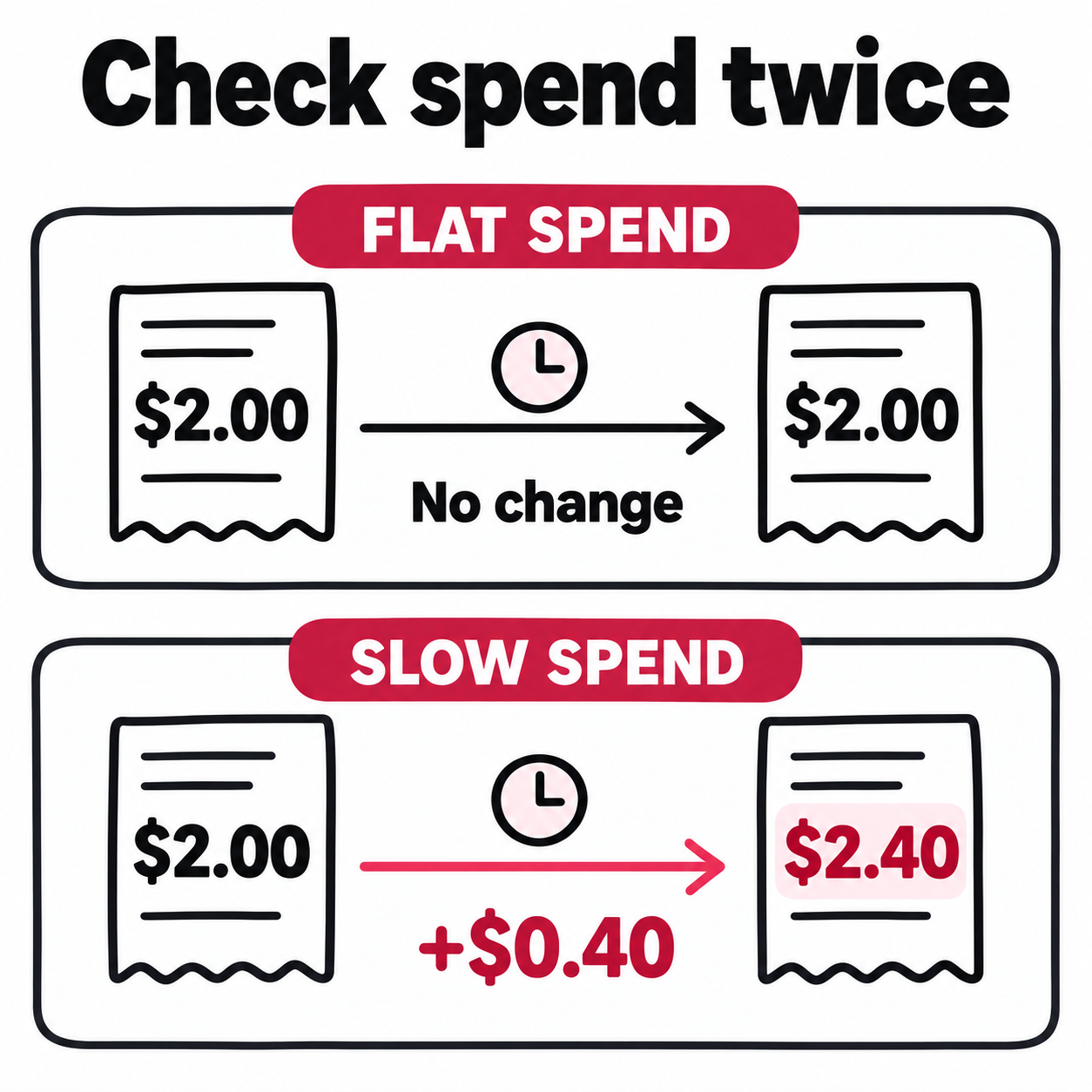
If both totals stayed flat, you’d have evidence of no reported activity during that window. You’d still need to separate a delivery problem from a reporting delay. Our TikTok analytics guide explains how the reporting screens differ.
Compare the pace with the time left
Suppose that order has a $20 total budget and four hours left. It would need to spend the remaining $17.60 at an average of $4.40 per hour to use the full budget.
That is much faster than the rate you just saw. It gives you a reason to check the setup now. It does not prove the budget will go unused: delivery can be uneven, and this is not a forecast.
Use this check when a launch has a deadline. You care whether the ad can still serve its purpose, not whether it might start spending after the event is over.
Keep review time and running time separate
TikTok says video Promote reviews usually finish within 48 hours after successful payment. If review took most of the day, don’t describe the order as having spent that whole day active. Use the approval notice and dates shown on the order.
If review runs beyond that usual window, contact support. If the order is rejected, address the reason without waiting for the window to end. TikTok’s Promote FAQ covers review timing and appeals; LIVE orders follow a different process.
How do you narrow down what’s causing the failure?
Compare the failed order with one that worked, then look for shared features across failures. This helps you choose the next check without paying for another campaign.
Use your saved records first:
| Pattern you find | Where to look first | What it doesn’t prove |
|---|---|---|
| One post fails while others run with similar settings | That post’s notice, sound, text, and linked offer | That the whole account is blocked |
| Several posts fail after the same setup change | The changed payment, goal, country, or account link | That every video needs editing |
| The same post works for views but has trouble with a website goal | The website goal’s setup and destination | That the video itself is unusable |
| Several posts share the same sound and rejection | Rights to that sound and the stated rule | That changing the audience will fix it |
These patterns set priorities. They are not proof of a cause. An order that worked last month ran at a different time, and its approval does not promise approval now.
Write one working theory: “The issue began after I linked Ads Manager,” or “Only posts using this track are rejected.” List the order IDs that fit it and any that don’t.
Check whether account linking is still in progress
TikTok says you cannot place new Promote orders while its Ads Manager integration is in progress. Once linking finishes, you should see a success notice. Check for that notice before treating a blocked order screen as a content rejection.
The Promote integration guide also lists unfinished orders, unpaid orders, and ongoing refund requests among the things you must clear before linking.
If the problem began during that change, tell support when you started it and which account ID you linked. Re-editing the video won’t finish the account setup.
If you’re asked for business documents, check the exact feature making the request. Our TikTok Business vs Personal account guide covers the tradeoffs before you switch profile types.
What should you fix or appeal after a rejection?
Fix the issue the notice names, or appeal that specific decision with evidence. A public post can pass normal posting rules and still fail the additional rules for Promote.
Start with a short record: reason shown → part of the ad it refers to → evidence or change needed.
- A music notice: Check every track, sample, and backing track in the clip. Save the license or permission that covers paid use.
- A claim or product notice: Check the spoken words, on-screen text, caption, and linked offer together. A change to one can leave the same claim elsewhere.
- A country restriction: Check the named rule for that market. Broadening the audience is not a fix for a prohibited offer.
- An unclear reason: Ask support which part of the ad needs review. Give them the order ID, notice, and relevant timestamps.
Use TikTok’s advertising policy directory to find the category named in your notice.
“Original sound” is a label, not a license
A song in the room behind you can become part of your original sound. So can a track added during editing. That label does not prove you have the rights to advertise it.
TikTok’s commercial music guidance explains the rights needed outside its cleared library. For musicians, permission to post a cover or use a backing track may not cover paid use.
Make the appeal easy to check
“Please review the object at 00:08; it is [accurate description]” gives a reviewer a specific point to inspect. For music, explain what you own or have licensed and provide proof where the appeal flow allows it.
If your appeal is approved, TikTok says you can promote the content again. Check the next action on the order. Keep the approval and any later rejection together if the same issue returns.
What should you test when an approved campaign barely spends?
First rule out a payment, review, date, or budget block. Then test one plausible limit, with a fixed budget and a clear result you can measure.
TikTok’s Promote optimization guidance suggests testing audience settings and duration. It does not establish a single audience size or spend level that fixes every order.
Check the requirements for your actual goal
Website visits and website conversions have different setup needs. TikTok says website conversions require an Ads Manager link and TikTok Pixel. The selected Pixel must match the website URL, and you choose an event to optimize for, such as a purchase.
Those setup requirements do not apply just to buy website visits. Check TikTok’s website-goal instructions before changing tracking tools.
For a conversion campaign, check the selected site, Pixel, and event. Use Test Events in Events Manager to check whether your intended action is recorded. A page visit alone doesn’t test a purchase event. If the event is missing, investigate that before blaming the audience. It may be a tracking fault even if the ad is delivering.
A views campaign that spends tells you that setup could deliver views. It does not validate a purchase campaign or show that purchase tracking works.
Write the test before you place another order
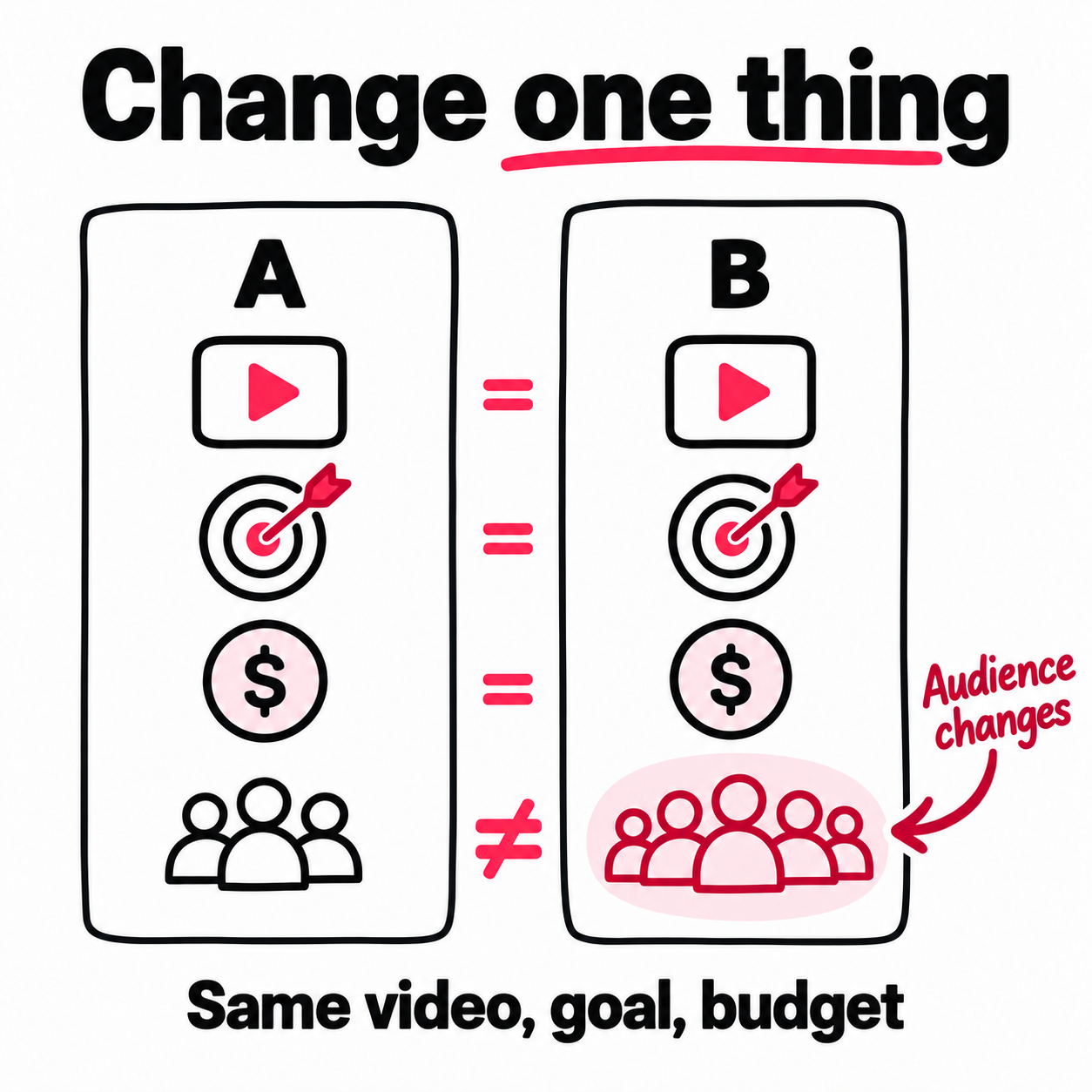
Here’s a test brief you can copy. It is our troubleshooting method, not a TikTok requirement.
| Decision | Example |
|---|---|
| Suspected limit | My custom interests may be too narrow |
| One change | Remove one optional interest filter |
| Keep the same | Post, goal, permitted country, budget, duration |
| Spend limit | A fixed amount I can afford to lose |
| Checkpoints | Same time since approval for both attempts |
| Evidence to compare | Status, added spend, added views, chosen result |
Keep age and country limits required by policy. Use our TikTok target audience guide to choose a change that still reaches people your content is for.
Don’t run a new paid test if an order already states that payment, review, or account setup is blocking it. That is a known issue to resolve, not a reason to fund another experiment.
Decide what each outcome means
- Spend rises and the desired result improves: The change is worth checking again. One run is not proof; timing and auction conditions also changed.
- Spend rises but the desired result does not: You improved delivery, but haven’t shown that the new audience serves your goal.
- Spend stays flat with the same settings check complete: Stop adding budget and escalate with both order IDs.
- A new rejection appears: Stop the comparison and address that notice. The two runs no longer test audience choice alone.
If people watch but don’t follow, move to our guide to TikTok views without followers. More delivery and more followers are separate questions.
How do you separate a payment failure from a missing refund?
Match the payment record, order record, and balance record before you retry checkout. Each answers a different question: was money charged, did the order spend it, and where is the unused amount now?
If your bank shows a charge but Promote says unpaid, keep the transaction reference and order ID. Ask support to match them. A pending bank charge alone does not prove a paid Promote order exists.
TikTok’s FAQ advises checking a valid card and payment method, plus a stable connection without a VPN. If it fails on both phone and web, report both attempts. That points support beyond an app-only fault without proving which payment step failed.
Reconcile the order before requesting money back
TikTok says unused funds from rejected or early-ended orders return to your Promote balance. A balance credit is separate from a withdrawal to your bank. Follow TikTok’s payment and refund guidance for your payment route.
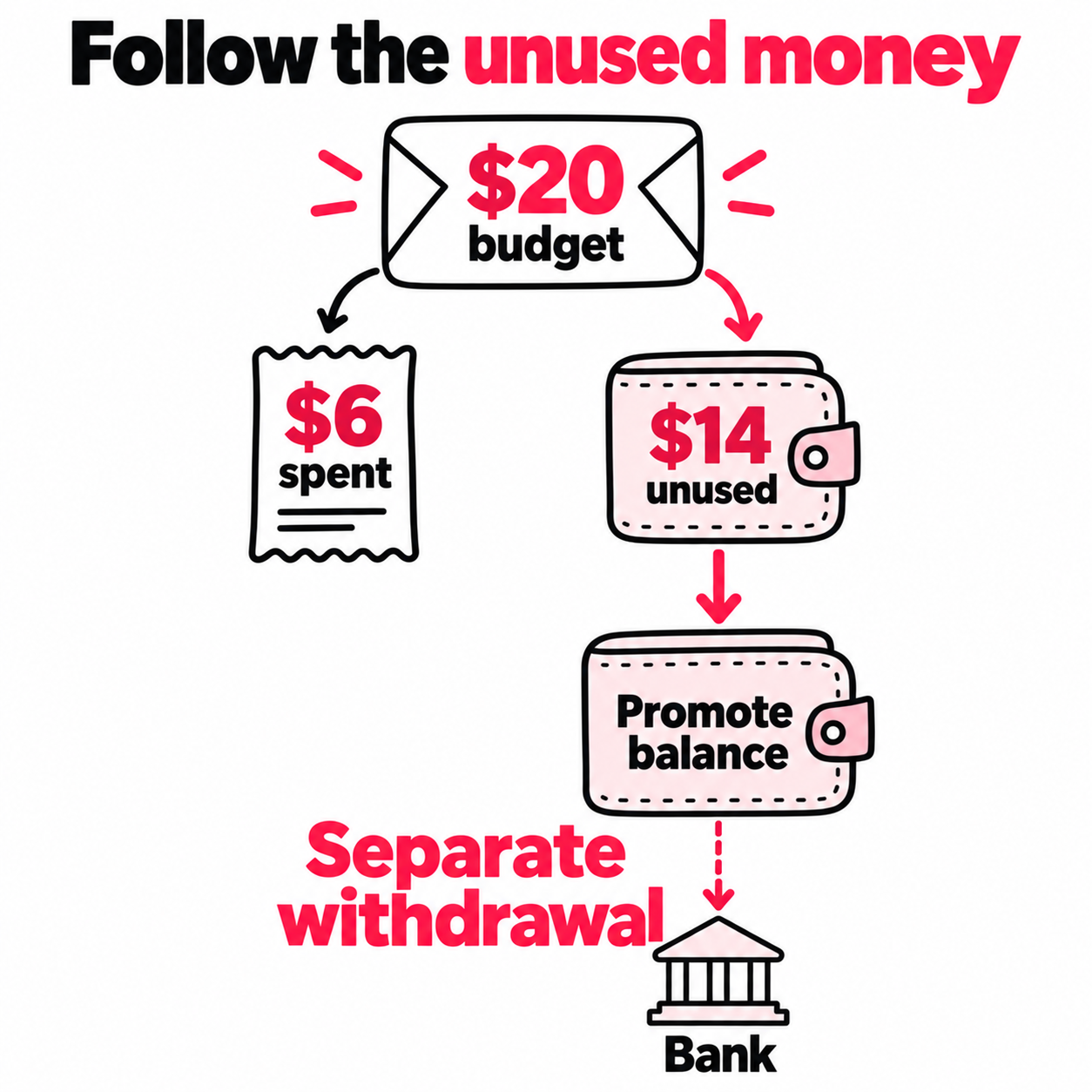
For a simple cash-funded order with no coupons, separate fees, or other balance activity, this example shows what to check:
| Record | Example amount |
|---|---|
| Delivery budget | $20 |
| Final delivery spend | $6 |
| Unused delivery budget | $14 |
| Promote balance before return | $5 |
| Expected balance after return | $19 |
The expected balance is $5 + $14, not another $20. If you launch a new order before checking, the returned funds may already have been used again. TikTok’s terms explain how Promote applies an existing balance. Include that new order in the record.
Coupons, fees, taxes, Coins, and other orders need their own entries. For those, use the actual amounts shown rather than forcing the example to match. Our TikTok Promote cost breakdown covers the broader fee questions.
Find the right next step for the money
Open Mine → Balance. If the unused amount is there, you’re checking withdrawal options. If it is missing, you’re checking the order-to-balance return. Tell support which of those failed.
App-store payments and Coins can follow different steps. A linked Ads Manager account also changes the balance and refund flow. Don’t close an account just because a withdrawal button is missing; first confirm which process applies and what closure would affect.
When should you stop testing and contact TikTok?
Contact support when a named blocker needs their review, or when your records show a mismatch you cannot resolve. Stop paid retries once they no longer test a new, plausible cause.
Escalate when:
- Review stays pending beyond TikTok’s usual video-review window.
- An approved appeal is followed by the same rejection on another order.
- Payment is complete but the matching order remains unpaid.
- An active order shows no new spend after the basic checks and repeated observations.
- The unused amount cannot be traced through your orders and balance.
Use the Help center in Promote’s Mine section. If your menus differ, follow TikTok’s in-app feedback instructions.
Give support one question to resolve, with this record:
Order and video: [order ID, video link, goal].
Timeline: paid [time], approved or rejected [time]. Time zone: [zone].
Evidence: at [time], spend/views were [values]; at [time], they were [values]. Exact notice: [text].
Comparison: order [ID] worked with [settings]. The known difference is [change].
Already checked: [payment, dates, budget, review, goal setup]. Appeal or payment reference: [ID].
Please check [one specific blocker or missing amount]. Relevant screenshots are attached.
Update the same ticket when new evidence arrives. For billing, include receipts with full card numbers and unrelated purchases hidden.
How do you keep the next launch from becoming another troubleshooting session?
Give each planned post a promotion budget, a delivery check, and its own result record. Save a working setup so the next upload starts with a plan you can check and repeat.
Decide what happens after you publish
Suppose you publish a three-part series: the problem, a demonstration, and an answer to a common question. Before the first upload, choose the country, budget per post, and which posts to include. Set a total limit for the series.
Keep a row for each video: published → submitted → approved → delivering → results checked. If the second video gets stuck in review, you can see the gap even while the other two spend. A healthy total for the series can hide a missing episode.
If you delegate or automate the work, give it those same rules. New public uploads can trigger promotion within a set post allowance, with a chance to skip a video before it starts. You keep control of the plan without placing every order by hand.
Automate the repeatable steps; give exceptions a named owner. Someone still needs to handle a rejection, missing delivery, or a result that needs a closer look.
Know where discovery starts
Your TikTok post is the destination. People can first encounter it inside TikTok or through an ad in another mobile app or website, then tap through to watch. That gives you another place to introduce a series to potential viewers.
This mobile ad discovery process has distinct steps: the ad appears, someone taps, and they reach your post. An ad impression, a tap, and a TikTok view measure different actions. Keep those figures separate when judging delivery.
Choose the route around the job: a specific native campaign goal, ongoing support for new uploads, or both with separate budgets. Our comparison of native boosts and ongoing post promotion explains those workflow differences.
Make each report useful for the next post
For each video, record its campaign dates, spend, traffic source, and delivered traffic. Keep public views, likes, and follows alongside that record, clearly labeled. A rise in public follows alone cannot tell you which campaign caused it.
When placement reports are available, compare sources using the same result and time window. Use that evidence to decide where the next round of spending goes. Then review the video itself: did the opening match the ad’s promise, and was there a clear reason to keep watching?
You now have two decisions you can act on: where to introduce the next post, and what to improve before publishing it.
Frequently asked questions
For a stalled TikTok Promote order, check three things first: the review decision, whether spend is rising, and where unused money went. Those checks tell you whether to wait, fix a blocker, or ask support to trace the order.
What does “Not delivering” mean on TikTok Promote?
It means the promotion isn’t running. The label alone doesn’t explain why. Open the order details and read the notice; TikTok’s Promote FAQ specifically links this status to rejected content that you can appeal.
If a rejection is shown, fix the named issue or appeal with evidence. A video being public does not prove it meets advertising rules. For a pack marked “Partially delivering,” check each video’s status separately.
How long does TikTok Promote take to start working?
For video promotions, TikTok says review usually finishes within 48 hours after successful payment. The promotion can run after approval. That is a review window, not a promise of views, followers, or sales within 48 hours.
If it is still pending beyond that window, contact support with the payment time and order ID. If it is already rejected, act on the reason now. If it is active, check spend rather than waiting for review again.
Why did I pay for TikTok Promote but get no views?
Payment, approval, and delivery are separate steps. Match your charge to the order, confirm its status, then compare campaign spend and views at two recorded times.
For an approved order with no new spend, check its dates, remaining budget, and notices. If spend rises but reported views stay at zero, save both screenshots and ask support to check the mismatch. A frozen public view count alone does not prove that paid delivery failed.
Should I cancel and restart a TikTok promotion that isn’t delivering?
Don’t restart it just to hope for a different result. First save the status, reason, spend, and order ID. Fix a known payment or review blocker before placing another order.
If an approved campaign is spending slowly, choose one change to test and set a spend limit. If its useful deadline has passed, ending it may make more sense than adding budget. Check the final spend and returned balance before reusing the funds.
Can I get a refund if TikTok Promote doesn’t deliver?
TikTok says unused funds from rejected or early-ended orders return to your Promote balance. This is separate from a bank refund. If $6 of a $20 delivery budget was spent, the unused amount is $14, not the full $20.
Check Mine → Balance. Withdrawal options depend on how you paid and whether Promote is linked to Ads Manager. For a supported bank-card withdrawal, TikTok’s FAQ says arrival can take up to 15 business days. If the unused amount never reached your balance, report that missing credit instead.