TikTok Account Ineligible for Recommendation? How to Get It Lifted
TikTok account ineligible for recommendation? Find the posts behind it, appeal the right way, and get back on the For You feed without starting over.
On this page
What does “ineligible for recommendation” mean on a TikTok account?
If “Ineligible for recommendation” shows up under your username, TikTok has limited your whole account, not one video. When your TikTok account is ineligible for recommendation, TikTok says your account and posts won’t appear in the For You feed and will be harder to find in search.
Your videos stay up. Followers and anyone who visits your profile can still watch them. But new viewers mostly stop showing up, which is why so many creators end up asking why their TikTok account is not being recommended.
Where the notice shows up
TikTok puts it in two places: right below your username on your profile, and as a notification in your Inbox.
If the only notice sits inside one post’s analytics, that’s a post-level flag with a different fix. Our guide to a single post that’s not eligible for the For You feed covers it step by step.
No notice in either place? Then your account isn’t restricted from the For You feed, and the problem is ordinary reach. Our 10 post audit for an account that stopped growing is the better place to start.
What an account notice limits
| Area | What changes |
|---|---|
| For You feed | Your account and posts aren’t recommended |
| Search | Your account and posts are harder to find |
| LIVE | TikTok may limit who sees your LIVEs or certain LIVE features |
| Creator Rewards | Content that’s off the For You feed doesn’t earn |
The LIVE limit comes from TikTok’s rules for accounts and features, which apply it to creators who repeatedly post content below the For You standards.
The money hit is direct. TikTok says content that isn’t eligible for the For You feed won’t qualify for Creator Rewards. Our breakdown of how much TikTok pays per 1,000 views explains how qualified views work.
What You’ll Learn
- How an account notice differs from a flagged post or a strike
- What triggers it, including the trap fan pages fall into
- How to find the exact posts behind it
- Both appeal paths, and what to do when there’s no Appeal button
- Why deleting videos or starting over usually backfires
- A recovery plan, and what to post while you wait
How is an account notice different from a flagged post or a strike?
A flagged post loses the For You feed alone. An account notice pulls every post off it at once. A strike is different again: a rule break that removes content and counts toward a ban. Mix them up and you’ll pick the wrong fix.
| Type | What it limits | How it ends |
|---|---|---|
| Flagged post | That one post isn’t recommended | An approved appeal |
| Account notice | All your posts, plus search | An appeal, or TikTok restores it on its own |
| Strike | The content is removed and counts toward a ban | Expires after 90 days, or an approved appeal |
The strike details come from TikTok’s page on content violations, strikes, and appeals.
An account notice isn’t a strike. TikTok applies it to accounts that don’t break the rules but still post a lot of content that can’t go to the For You feed. One creator on Reddit who has had both says “ineligible for recommendation” never came with a strike.
If TikTok ever offers you optional policy training in the app, take it. TikTok says that in some cases it can restore full access.
Why does TikTok make an account ineligible for recommendation?
Because the account posts a lot of content that can’t go to the For You feed. The same accounts and features rules describe accounts that “don’t break the rules” but “still post a lot of content that’s ineligible for the FYF.” TikTok may make those accounts ineligible and harder to find.
So the question isn’t “which video did it?” The real question is what your flagged videos have in common. The full list of what’s ineligible lives in TikTok’s For You feed eligibility standards. These are the patterns that catch normal accounts:
| Pattern | What it looks like | The fix |
|---|---|---|
| Reused or cross-posted clips | Reels with another app’s watermark, clips from shows, your own old file uploaded again | Upload clean master files. Add real edits or your own footage |
| Low-effort posts | GIF-only clips, slideshows of photos you didn’t take | Make each post something new |
| Engagement bait | “Like for like,” fake giveaways for follows or gifts | Drop the trade. Earn the follow |
| Fan or parody accounts | Posting as a celebrity without saying it’s a fan account | Put “Fan” or “Parody” in your display name |
If most of your flags say “unoriginal,” our guide to the TikTok unoriginal content flag shows how to cross-post your own videos without getting flagged.
The fan page trap
If you run a fan, parody, or tribute account, your display name matters more than your bio. TikTok’s authenticity and impersonation rules ban pretending to be someone else “without clearly stating that the account is a fan or parody account in the display name.”
So a line in your bio may not be enough. Creators report fan pages restricted for “impersonating a celebrity” even though the account said it wasn’t the real person. Another said TikTok’s reply to an account appeal told them to edit their profile.
Put “Fan” or “Parody” in the display name itself, then appeal and mention the change.
Bought followers or likes are a separate, bigger problem. The same rules let TikTok keep deceptive accounts out of top search results and the For You feed. Our guide on whether TikTok growth services are legit explains the risks.
How do you find the posts behind the notice?
Open the notice and tap View more. TikTok lists the videos that led to it. That list is your real to-do list.
- Open the notice. Tap it under your username, or open the notification in your Inbox.
- Tap View more and go through each video TikTok shows you.
- Write each one down: the date, the reason, and what was in the video. A note on your phone is fine.
- Run Account check. Go to Profile, the menu, TikTok Studio, then Account check under More tools. TikTok’s Account check guide lists a second path through the Safety Center. It reviews your last 30 posts. A checkmark means no issue. A warning sign means there’s one to look at.
- Screenshot everything with the date showing. You’ll want it for the appeal.
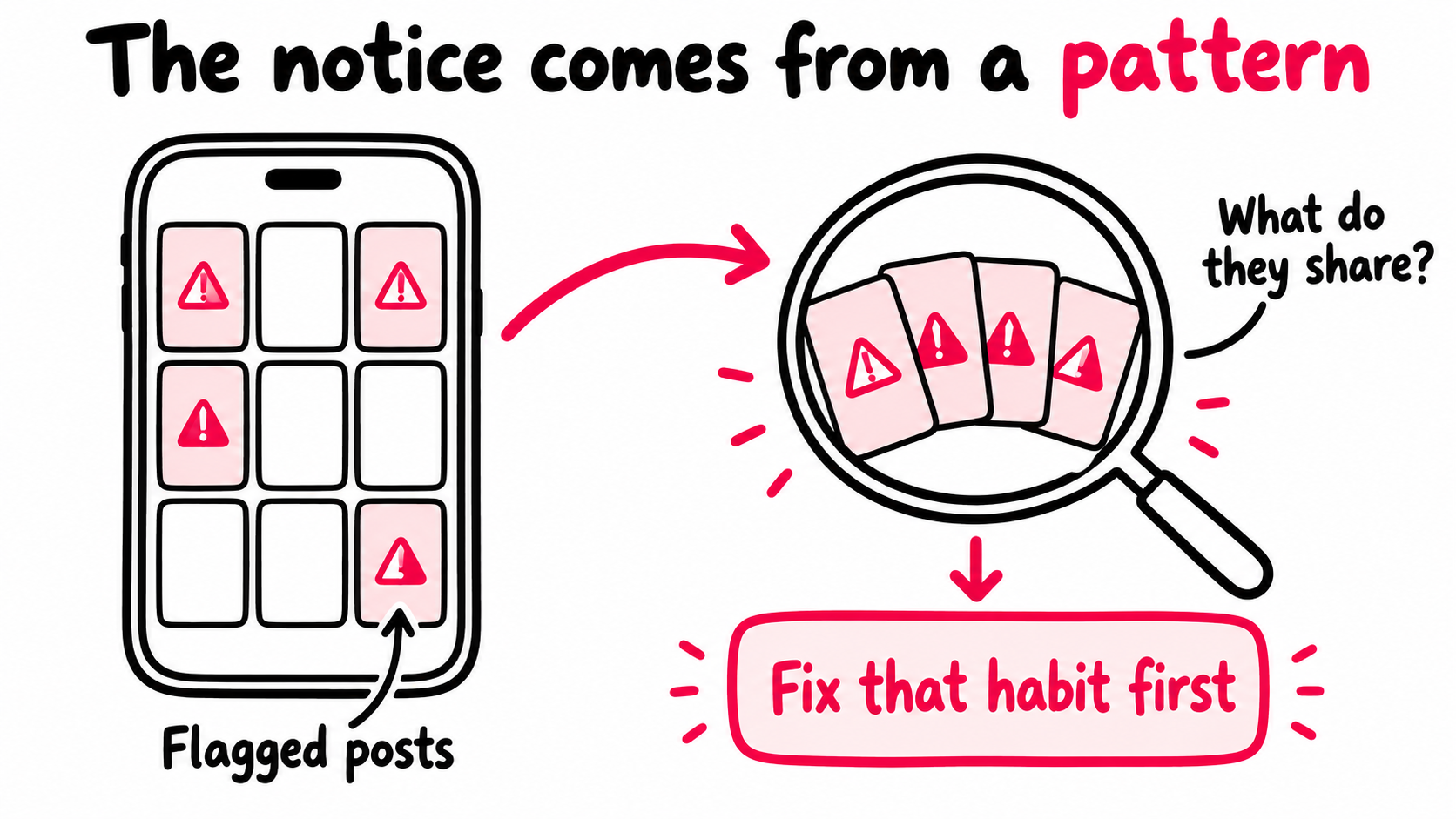
Now look for the common thread. A travel creator who films for Instagram first might find every flagged post is a downloaded Reel. A candle shop might find its three “like and follow to win” giveaways. Fix that one habit and every post after it starts clean.
When Account check says everything’s fine
Creators report this a lot: the notice sits under the username while Account check shows no issues. One said tapping the notice itself claimed the account was fine.
Trust the notice, since it’s what limits your reach. Screenshot both screens. The mismatch is useful evidence in an appeal or support report.
How do you appeal an account that’s ineligible for recommendation?
Use either of the two paths TikTok gives you: the Inbox notification or the notice on your profile. If the flags were right, fix the pattern first so your appeal can say so.
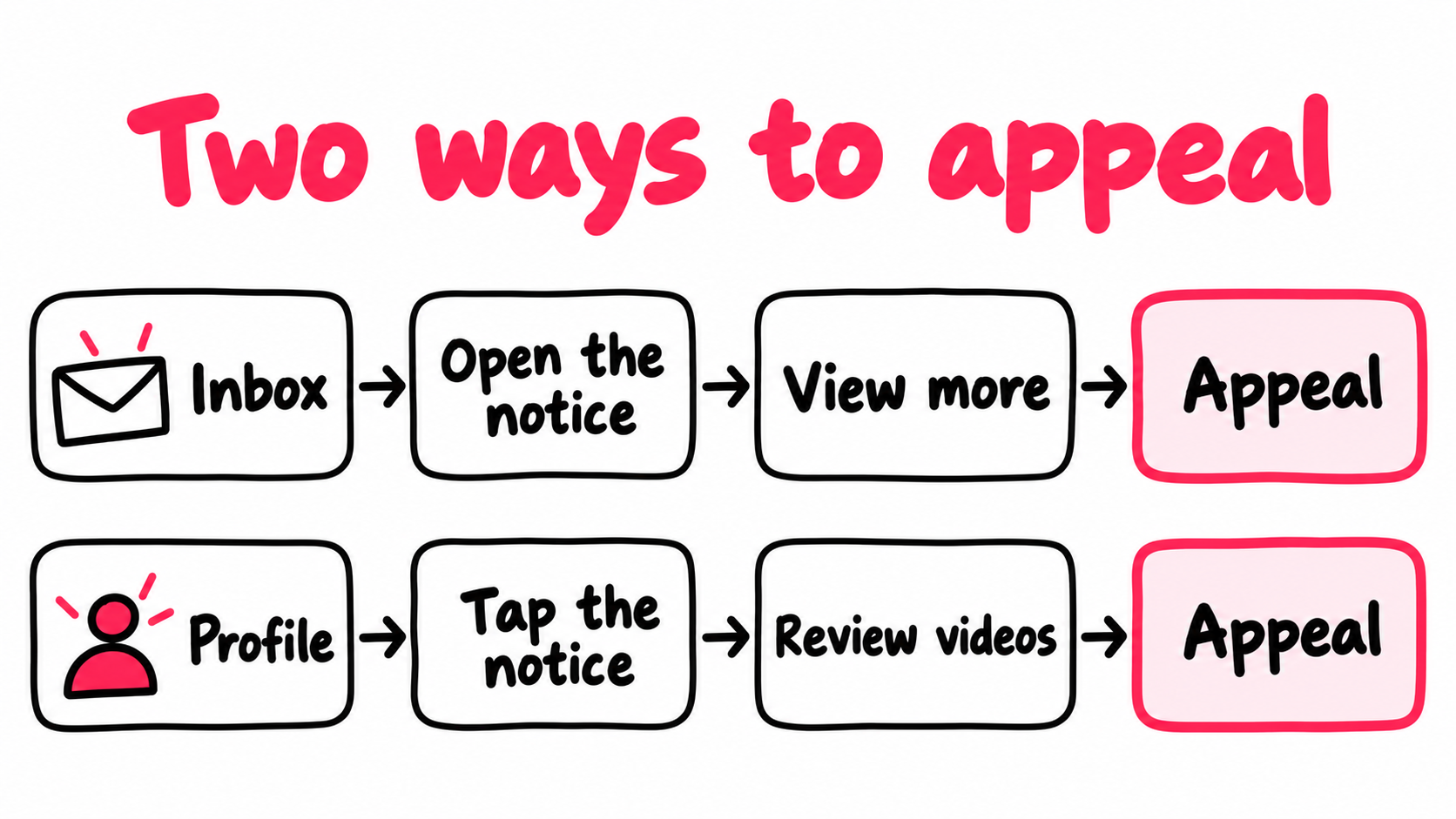
- From your Inbox: open the notification, tap View more, review the videos, then tap Appeal.
- From your Profile: tap the notice below your username, review the videos, then tap Appeal.
Once it’s filed, you can follow its status in the in-app Safety Center. TikTok mentions this on its enforcement and appeals page. It doesn’t promise a timeframe.
What to write
Cover the account, then the posts, with facts a reviewer can check.
What my account is: A travel account. I film and edit everything myself on my phone.
The posts behind the notice: Four videos, all marked unoriginal.
Why the flags are wrong: These are my own clips. I post them to Instagram too, but the files I upload to TikTok are my original exports with no other app’s watermark.
What I changed: Since the notice, I only upload original files, and every new post is new footage.
What I can show: The original recordings with their dates, plus photos from where I filmed.
For a fan account, the “What I changed” line might read: “My display name now says Fan account, and my bio says I’m not the real person.”
One creator’s appeal routine: use the full character limit, and attach as many photos as the form allows, like the filming spot and the props on screen. Calm and specific beats angry and vague.
If the appeal won’t go through or doesn’t help
Creators report a “network issue” error on the appeal screen while the rest of the app works fine. Update the app, switch between Wi-Fi and mobile data, and try again later.
And if it’s approved, give it time. An approval removes the notice. It doesn’t bring back the reach you lost. One creator said their videos still weren’t reaching For You a day after an approved account appeal.
What if there’s no Appeal button?
Check both paths, update the app, then report it. While you wait, keep posting clean, since TikTok may lift the notice on its own.
Creators report a missing button most often when the notice is tied to a video they’d already deleted, or when tapping the notice says there are no issues.
- Try both entry points. Open the notice from your Profile and from your Inbox. One may show Appeal when the other doesn’t.
- Update TikTok and check again.
- Report it. In Settings and privacy, use Report a problem. Describe the notice, say there’s no appeal option, and attach your screenshots.
- Keep posting new, clean videos. TikTok says it may restore your account to good standing automatically.
Will deleting the flagged videos clear it?
Not reliably. TikTok ties automatic restoration to how much of your content isn’t suitable for the For You feed. But creators report the notice staying put after the videos were gone.
One creator made a video private after Account check flagged it. A month later, an account notice appeared, citing that same private video. Deleting it didn’t clear the notice, and there was no way to appeal.
Deleting has real costs:
- You can’t appeal a video that’s gone, and it was your best evidence.
- You lose what the post earned: its views, comments, and the followers it brought in.
- Re-uploading the same file is worse. A second copy can get flagged as reused content.
Appeal first. Taking down a post that truly breaks the standards, like someone else’s clip with their watermark, is reasonable. Just don’t expect it to lift the notice, and don’t wipe your profile.
How long until TikTok restores your account?
TikTok doesn’t publish a timeline. It says it may restore your account to good standing “at any time,” depending on how much content on your account isn’t suitable for the For You feed. Otherwise, you appeal.
Creator reports don’t help much here. People post when they’re stuck, not when a notice quietly disappears, so the stories skew long. One creator said their account hadn’t been recommended for about four months, despite many appeals and ID submissions.
Why going quiet doesn’t work
Going silent feels safe. Creators who tried it mostly report no change. One whose whole account had stopped reaching For You took seven full days off, and the next video still got zero views. Theories about a fixed 50 day “cooldown” also go around, with no proof behind them.
A break doesn’t change how much of your content is ineligible. New clean posts do.What to post while you wait
- New footage, uploaded from your original export, with no other app’s watermark
- Nothing from the pattern you found behind the notice
- No trades like “like for like” or “follow for a shoutout”
- The disclosure setting on whenever you promote your own product or shop
- A pre-check on posts that matter: TikTok Studio on the web has a free Content Check Lite that flags likely problems before you post
Post at your normal pace, and once a week check where your views come from. When For You traffic shows up again, look under your username. Our guide to reading TikTok analytics by traffic source shows where.
Should you start a new TikTok account instead?
Not to get around the notice. TikTok’s authenticity rules say that if your account is restricted, “you may not create or use another account to get around it.” They list using another account to avoid “FYF-ineligible content restrictions” as not allowed, and say TikTok may ban new accounts you create when it finds deceptive behavior.
There’s a practical problem too: a new account doesn’t fix the habit that caused the notice. One creator whose TikTok account was not recommended after an impersonation flag and a denied appeal lost For You reach on a new account as well.
Fix the account you have
- Keeps your followers, comments, and history
- Has an official appeal path
- Every clean post helps your case
- Stays inside TikTok's rules
Start over to dodge the notice
- Breaks TikTok's rule against using another account to avoid restrictions
- Can put the new account at risk too
- Starts from zero followers
- Repeats the habit that caused the notice
When a second account is fine
TikTok allows more than one account for things like fan content or creative expression, as long as you’re not deceiving anyone. A bakery can run a shop account next to the owner’s personal one.
Just don’t post the same videos on both. One creator reported that doing so left one of the accounts with flag after flag.
Can you promote your way out of it?
No. Promotion can’t override TikTok’s decision, so don’t spend money on posts while the notice is active. Paid viewers can watch a post, but they can’t make TikTok recommend your account again. Promoted views also don’t count toward Creator Rewards.
Once the notice lifts, the problem changes. You’re no longer blocked, but you’re restarting a quiet account. Each new post is judged by how its first viewers respond, and after weeks off the For You feed, those viewers are mostly your existing followers.
That’s the gap automatic promotion for each new TikTok post is built for. Each new public post in your plan is picked up while it’s fresh and shown to new viewers outside TikTok, through ads in apps and websites they already use. They land on your actual post, where they can watch, like, comment, and follow.
Each post also gets its own report, kept separate from TikTok’s numbers. After a notice, that split tells you something. If promoted viewers watch and react but For You traffic stays near zero for days, look under your username again before you blame the video. If you’re rebuilding as a creator, see how TikTok promotion for creators works.
What’s the fastest way to fix ineligible for recommendation on TikTok?
There’s no instant fix, but there is an order. Each step makes the next one work better.
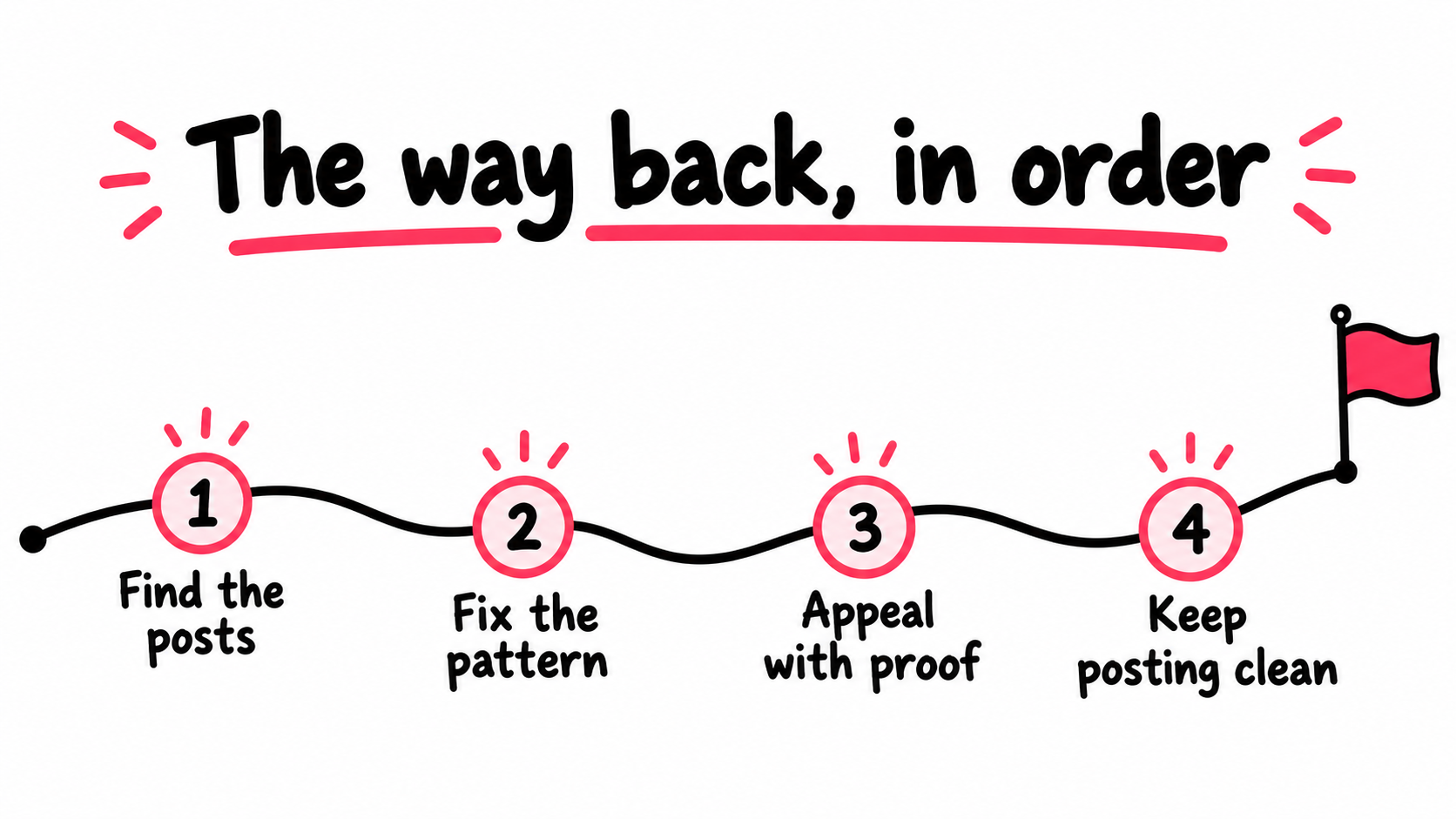
- Today: Screenshot the notice, list each post behind it, and run Account check.
- This week: Fix the pattern. Clean master files, a “Fan” display name if it applies, no bait.
- This week: Appeal from your Inbox or Profile, with proof attached.
- The next few weeks: Post new, clean videos at your normal pace. Check traffic sources weekly.
- Skip: mass deleting, re-uploading, new accounts, bought engagement, and promotion while the notice is active.
- Once it lifts: Give every new clean post the strongest start you can.
Want an outside look at your account while you work through this? Run your handle through our free TikTok profile analyzer. And if the notice is gone but views are still low, our guide to why TikTok views drop with no notice picks up from there.
Frequently asked questions
How long does ineligible for recommendation last on a TikTok account?
TikTok doesn't give a timeline. It says it may restore your account automatically at any time, depending on how much of your content isn't suitable for the For You feed. Otherwise, you can appeal.
Creator reports vary widely, and some say they've waited months. The two things you control are a solid appeal and a steady run of new, clean posts.
Why does my account say ineligible for recommendation when Account check says no issues?
Creators report this mismatch a lot, and TikTok doesn't explain it. Trust the notice under your username, because that's the one limiting your reach.
Screenshot both screens with the date showing. Then open the notice, tap View more to see the videos behind it, and mention the mismatch in your appeal or support report.
Can my followers still see my videos if my account is ineligible for recommendation?
Yes. Your posts stay up, and anyone who follows you or visits your profile can still watch them. What you lose is the For You feed, and your account gets harder to find in search.
So expect most of your views to come from people who already know you until the notice lifts.
Does ineligible for recommendation affect Creator Rewards?
Yes. TikTok says content that isn't eligible for the For You feed doesn't qualify for Creator Rewards. Most qualified views come from the For You feed, and the notice cuts your account off from it.
Expect earnings to drop sharply while it lasts. Paid views don't count as qualified views either, so the fix that matters for payouts is getting the notice lifted.
Will taking a break from posting fix ineligible for recommendation?
Creators who tried it report no change. One took a full week off, and the next video still got zero views and no For You reach. TikTok doesn't describe any cooldown period.
TikTok ties restoration to how much of your content isn't suitable for the For You feed. A break doesn't change that. New, clean posts at least add eligible content to your account.