Can’t Promote Your Own Song on TikTok? Why It Happens and What to Do
Can’t promote your own song on TikTok? Diagnose the rights or sound issue, build a stronger appeal, and choose a campaign route that protects your release.
On this page
Why can’t you promote your own song on TikTok?
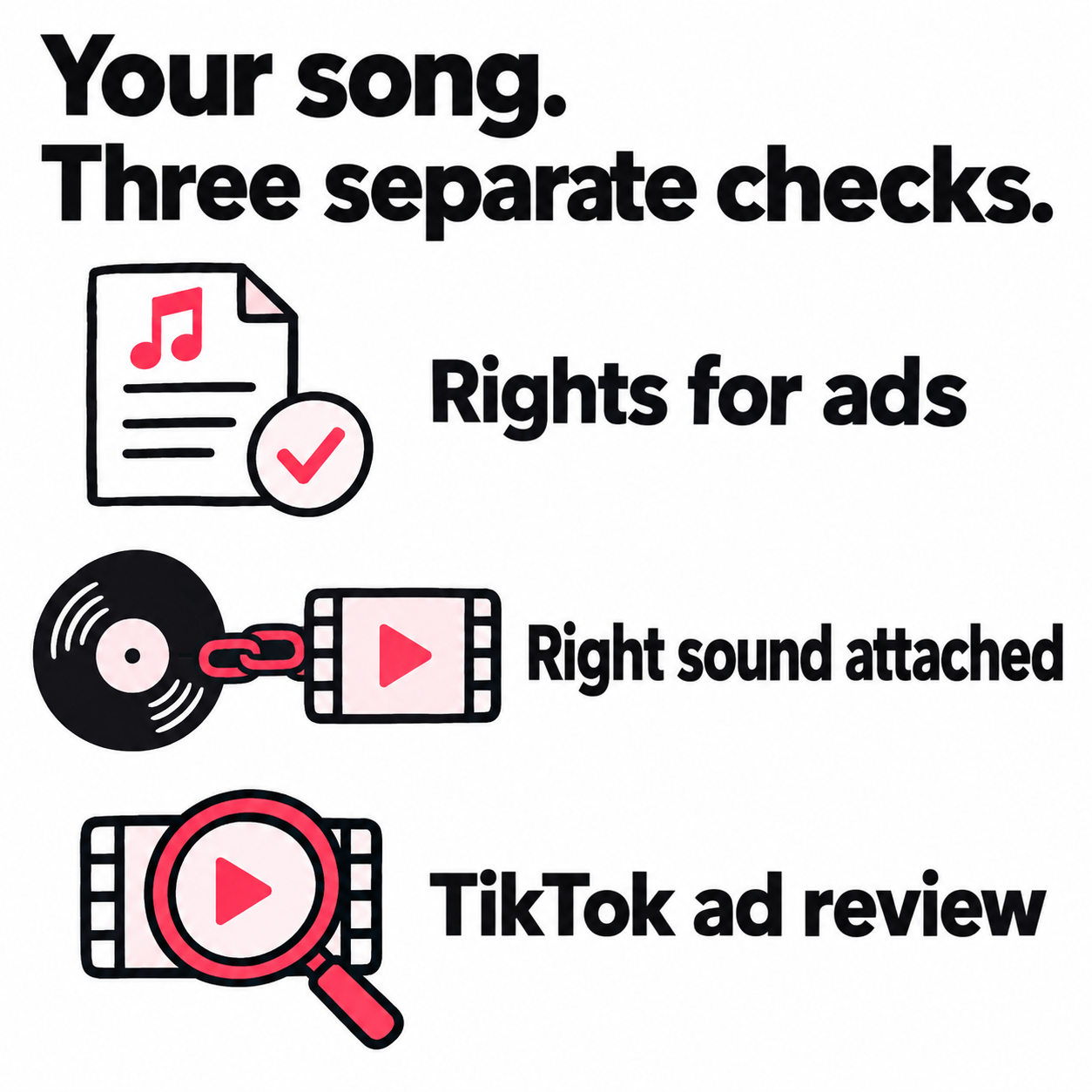
Owning your song and getting TikTok to approve it for ads are two separate problems. If you can’t promote your own song on TikTok, check three things: your rights for that use, the attached sound, and the proof TikTok has asked for.
Your release can be live while the ad stays blocked
A track in your Music tab shows that the release is linked to your profile. It doesn’t prove the track is cleared for paid ads. Even with full rights, you may need to get a claim reviewed or your proof accepted.
TikTok’s Promote rules allow original sound or sounds that can be used for commercial purposes. Its commercial music guidance says TikTok’s licenses outside the Commercial Music Library do not cover commercial use.
You need to show that the rights cover the campaign, the post uses the right audio, and TikTok accepts that use through your chosen ad tool. Solving one does not settle the other two.
What You’ll Learn
- Narrow the block to a track, post, account, or ad-review issue.
- Build a rights file that answers the reviewer’s actual question.
- Give your distributor a clear task instead of a vague complaint.
- Weigh a new upload against the value of your official sound and existing post.
- Keep the campaign moving without losing sight of the release goal.
How do you tell which part of the process is blocked?
Match the failure to the stage where it happens. That tells you who can act. Your distributor may be able to fix release data but have no control over the ad decision.
| What fails | What to establish next |
|---|---|
| The track cannot be found in Sounds | Ask for the delivered track’s sound URL. Check access from your account and the intended country. |
| The post plays, but Promote blocks its audio | Confirm the exact sound entry and rights for paid use. Send the notice through Promote’s support or appeal path. |
| The published post is muted | Read the sound-removal reason. Resolve that decision before sending paid traffic to the post. |
| Ads Manager asks for music authorization | Match the track and rights holder to the requested proof. Treat a failed name field as its own support issue. |
If the track is missing only on a Business account, account access is worth checking. TikTok’s Commercial Music Library instructions explain that Business accounts see Commercial Sounds, while Personal accounts can access the broader library.
If the track already plays and only the boost fails, switching profiles may not address the block. Use the Business versus Personal account guide when the evidence points to account access, rather than changing your setup as a first guess.
Also separate an audio rejection from a campaign that passed review but is not spending. Budget and charge questions belong in the TikTok Promote cost guide.
What can you learn from the attempts you’ve already made?
Compare attempts that differ in one useful way. The results can narrow your next question without proving why TikTok made the call.
Use your past posts and orders to build a short record. Note each post URL, sound URL, audio source, account, ad tool, target country, and result. Two sound entries can share a song title, so keep the links too.
| Pattern in your attempts | What it helps you ask |
|---|---|
| Several clips using one sound fail, while other tracks pass | Is the block tied to this sound or its rights record? Changing the hook is a lower priority. |
| One clip fails while another using the same sound passes | What else changed in the video, caption, audio mix, or ad settings? |
| The library version fails but an embedded export passes | Does the source of the audio affect review, and does the accepted post still link to the official song? |
| Posts with different sounds all fail | Is there a wider account or ad-policy issue? Read each notice before blaming the track. |
| Only one target country fails | Do the music permissions or ad rules differ for that country? |
Treat these patterns as clues. Review can vary for reasons you cannot see. If an MP3 upload passes, check what else changed. A new post, sound entry, or account means you haven’t isolated the file type as the cause.
Make the next test answer one question
Use past results first. If a new test is worth making and you have the rights, name the one change you’ll test. Keep the track segment, video, caption, and ad settings the same where the tool allows it.
For example: “Does my cleared audio pass when it’s part of the export, but fail when I select the library sound?” You may need a new post for that test. Keep the original live. If the new one passes, check its sound entry before calling it a win.
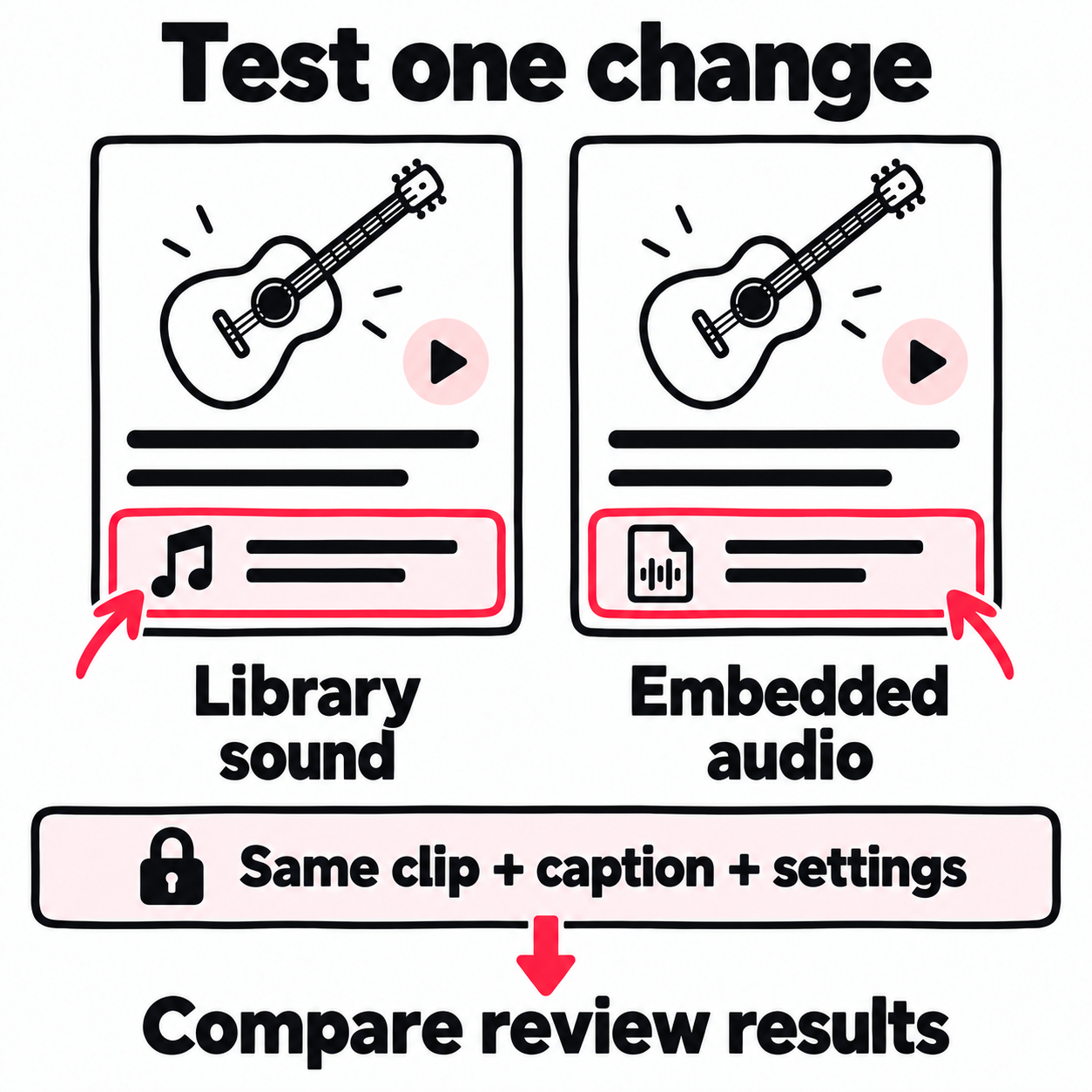
Record what passed and through which setup. That gives support a useful comparison. Another upload or paid order is worth trying only if it answers a question the last one left open.
What proof makes a music-rights appeal stronger?
Show both your link to the track and your right to use it in the planned campaign. A release screenshot may show the first but say nothing about the second.
The U.S. Copyright Office explains rights in a recording and in the song itself. The recording is the master; the music and lyrics are the composition. Check what your label, publisher, co-writer, or beat license lets you approve.
Match each document to a claim
Build the file around the claims you need to support. TikTok may ask for different proof in different cases:
| What you need to show | What to put in the case |
|---|---|
| Which recording is involved | Track title, version, artist, ISRC, official sound URL, and the rejected post or ad ID |
| Who controls the recording | Relevant ownership terms, label permission, or other records that support your claim |
| Who can approve the song’s use | The agreement or permission that covers the composition and this use |
| What the campaign is allowed to do | Paid video use, platforms or placements, countries, dates, and any limits |
| Why your name differs from the rights holder | A short explanation backed by records linking your artist name, legal name, label, or company |
An ISRC names the recording, not its current owner, as IFPI’s ISRC guidance explains. Use it to locate the right asset, then supply separate proof of rights.
A split sheet can show writing shares. Check whether it also grants the use you need. Session files can help show that you made the track. They don’t explain any later label deal or sample license.
Read the scope of a beat or sample license
A clause that lets you release the track or earn streams may say nothing about paid video ads. Look for terms on video use, ads, third-party use, countries, and the length of the license.
If the wording is unclear, send the rights holder the actual plan:
Please confirm whether our agreement covers [exact track/version] in paid video ads on [platforms and placements], in [countries], during [dates]. The advertiser will be [artist/company], and the ads will promote [release]. If this use needs separate approval, please confirm the scope and fee.
Name who will run the ads: you, a label, manager, service, or creator. Ask whether their use is covered too. “Can I promote this song?” leaves too much open.
If you control all the rights
Build the case around that fact. Identify the recording and song, state who controls each, and point to the records that support it. Explain any different names in the release data.
If TikTok still rejects the audio, ask which claim or document it cannot verify. Buying another license makes no sense unless someone identifies a right you are missing.
What should your distributor check before you change the release?
Ask them to check the track and release data they sent, then name any claim they can help with. “The song is live” does not resolve an ad rejection.
Send the ISRC, sound URL, post URL, and exact notice. Give the distributor these tasks:
- Confirm the asset: Is this sound URL the entry for the recording and version you delivered?
- Confirm the data: What artist, label, and rights-holder names were sent? Are any fields wrong or out of date?
- Confirm the territory: Was the recording delivered for the country where the problem occurs?
- Separate the issue: Is there a delivery error or claim they can act on, or is this a TikTok advertising decision?
- Name the next action: What would they change, and which result should that change produce?
If they offer allowlisting, ask what it covers: a profile, a recording, organic uploads, or paid ads. Approval for a claim on another platform is not evidence that TikTok Promote will accept the track.
How do you escalate the issue without repeating the same appeal?
Name the failed step, the rights you hold, and the decision you want reviewed. Follow up with new proof or a question the reply did not answer.
Use the right review path
- Promote: Use Appeal on the failed order if shown. If audio is blocked before an order exists, report that through in-app help with the post and sound links.
- Muted post: Follow the notice on the video. TikTok’s sound-removal appeal process addresses restoration of the audio, not approval of a paid boost.
- Ads Manager: Open Campaign → ad or ad group status → View more → Appeal, where available.
TikTok’s Ads Manager appeal guidance allows a written reason and supporting files. The whole ad group goes back through review. You also cannot edit the ad or ad group once you have sent the appeal. Finish your evidence and settings first.
The published limits are 2,000 characters for the reason and up to five PNG, JPG, or PDF files, each no larger than 10 MB. Lead with the clause or record that answers the rejection. Tell the reviewer which page to read and what it proves.
If TikTok cannot verify a record-company name, include that error as well as the audio notice. Ask your distributor to confirm the name it sent. If it is correct, ask TikTok for the route to verify it. Trying different invented names only makes the case harder to explain.
A support brief for a rights holder
Keep the explanation short enough that a reviewer can connect each attachment to a claim:
Subject: Audio review for [track/version], [post or ad ID]
Failure: [Exact notice] occurs in [Promote / Ads Manager / sound review] at [step]. The post is [playable / muted]. Post: [URL]. Sound: [URL]. ISRC: [code].
Rights: [Party] controls the master, and [party] controls or can license the composition. Our permission covers [paid use, placements, countries, dates]. [Explain any different artist, label, or company names.]
Evidence: [File 1 and what it proves]. [File 2 and the relevant clause or page]. [Distributor confirmation, if relevant.]
Request: Please review the decision for this asset and use. If it cannot be approved, identify the missing permission, mismatched detail, or rule that prevents it. Please confirm whether this ad tool can support the use once the issue is fixed.
This is a suggested brief, not a TikTok form. Share documents through official support. Include the terms needed to assess the use, while removing unrelated payment and personal details.
If the reply does not answer the case
Follow up on the same case with the missing point: “The reply covers using other artists’ music. Our attached agreement covers this master and composition for paid ads. Which part of that permission is insufficient?”
If the answer names a gap, address it. If it repeats a general rule, ask which part applies to this sound and planned use. For a failed Ads Manager appeal, use the customer-support route shown in the appeal result rather than filing duplicate appeals.
If support confirms that this sound cannot run through Promote, another unchanged submission adds little. Keep that answer with the case and choose a route that supports your cleared use. Reopen the issue when the asset, permission, or stated rule changes.
Should you re-upload the song as original sound or use Spark Ads?
Choose based on what you need to keep: the same post, the official sound, or the route to a listening page. Neither method removes the need for music rights and ad approval.
Original sound can change the asset you are growing
One artist in a Reddit discussion about promoting their own songs reported that embedding the audio let them promote, but they lost the official audio listing. That is a reported outcome, not a verified fix for every account.
For a release campaign, the tradeoff is more than the label under the video:
- Does the accepted post lead to the official sound or a separate entry?
- If creators use it, which sound page will hold those posts?
- Are your artist clips and paid creator posts pointing to the same intended sound?
- Will the new post leave useful comments and engagement on the old one?
If the goal is more uses of the official sound, a separate sound entry may work against that goal. If the goal is visits to a release link, it may be a workable choice once rights, approval, and the listener route are confirmed.
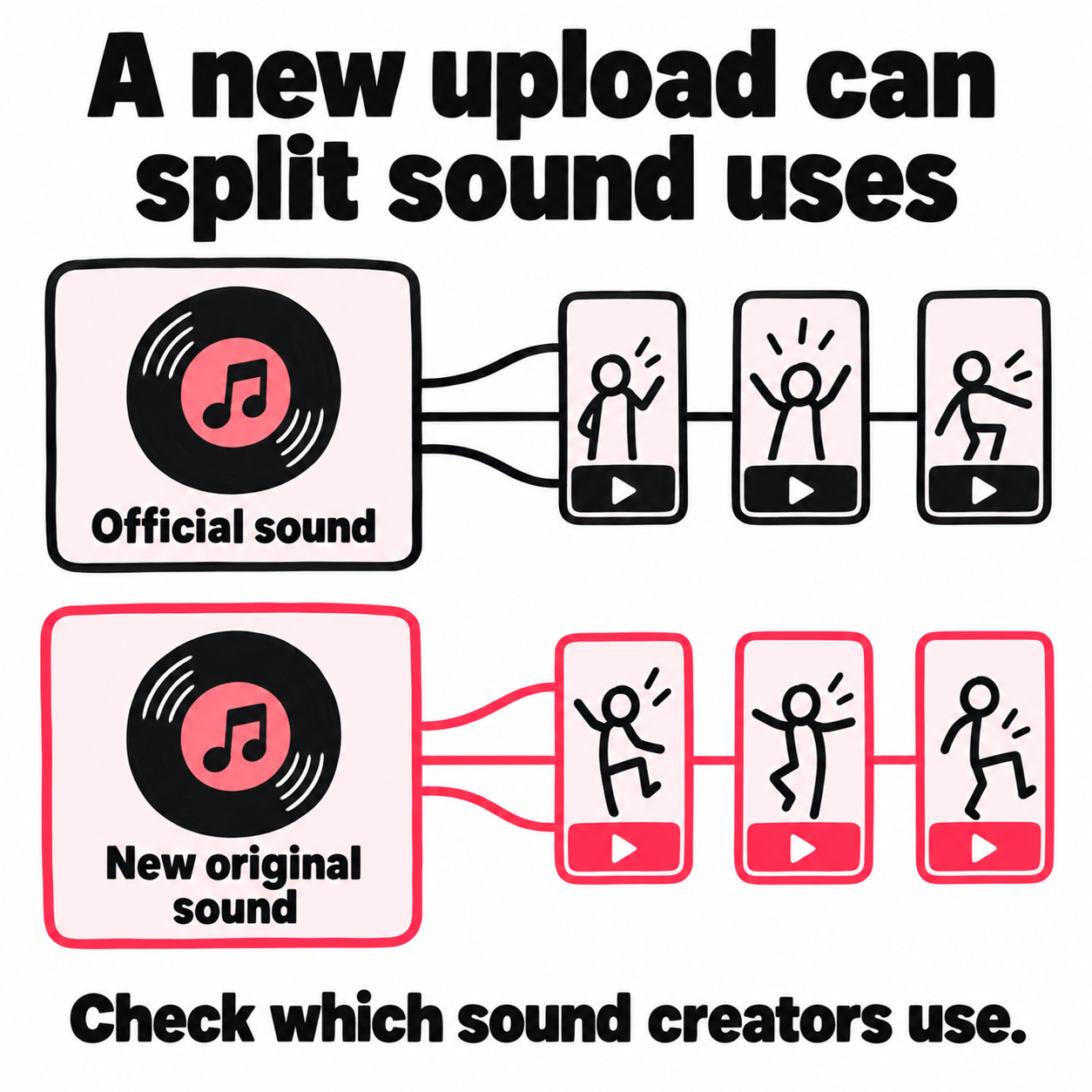
Keep the original post and record both sound URLs. Do not assume the entries will later merge or that reporting will combine them.
Spark Ads can preserve the post, but still need music review
TikTok’s Spark Ads overview says the views, likes, comments, and other engagement gained through the ad stay with the original post. It also describes music-page clicks and how they are reported.
That can matter when you already have a strong artist post and want paid reach to build on it. But a code that lets an advertiser use your post does not grant rights to every piece of music inside it.
Ask whether your setup can support the intended sound and use before building the campaign around it. If you run it, review music clicks separately from visits to a landing page. They show different listener actions.
Reasons to change the setup
- The notice names a sound or rights detail you can correct.
- A controlled comparison narrows the next support question.
- The approved version preserves the campaign’s intended destination.
Weak evidence for a fix
- One changed upload passed after several other settings changed.
- A WAV-to-MP3 conversion appeared to avoid a match.
- A silent track or pitch change is treated as music clearance.
What should you do if the release cannot wait for approval?
Set a cutoff based on your release schedule. Then choose a route that can serve the goal with your current rights and assets. Keep the support case open, but give the campaign a plan it can run without that reply.
Protect the part of the plan that matters
Suppose your appeal is still open as paid creator posts are due to go live. Agree which sound URL they should use and confirm the rights for those paid posts. Avoid sending each creator a different export just because one version appeared to pass your own test.
If a post already has useful comments or sound uses, keep that asset in the plan. A fresh upload starts a separate post. Decide whether getting it approved is worth moving paid reach away from the one that is already working.
Use your TikTok content calendar to separate posts ready to run from those waiting on rights or review. Set the decision point before booked placements or creator deadlines, not after the budget is committed.
Keep the post. Change how listeners find it.
Where someone discovers your clip and where they watch it do not have to be the same place. An ad in a mobile app or website can introduce the song, then send an interested listener straight to your existing TikTok post.
That gives you a way to bring new people to a post that already works. Its comments, sound link, and route to your artist profile stay in place. You can build on that post without making a new upload just to create another route to it.
Use the same song segment in the ad and the destination post. Someone who taps to hear the chorus should land on that chorus, with the right sound attached. Confirm that your music rights cover the outside placements before running them.
This fits a campaign built around a public post that plays correctly. If your goal is traffic straight to a release link, choose the destination for that goal. The TikTok Promote alternatives comparison covers the wider choice of routes.
Set the rules once for the release
A release may have a lead clip, a live take, and several follow-ups. If each needs a fresh ad setup, promotion becomes a second schedule to manage alongside posting.
For TikTok promotion across a music release, decide what should happen when each eligible clip goes live. Give every campaign a clear destination and spending limit before release week starts.
| Decide once | Put it in the plan |
|---|---|
| Which posts qualify | The release clips with cleared audio; skip posts still awaiting rights or review |
| Where listeners land | The original public post for that clip, with its intended sound link |
| When promotion starts | After the post is detected and the ad is approved, without another manual submission |
| How spend stays bounded | A budget per post, a limit on included posts, and a way to pause or skip |
| What comes back after each campaign | Spend and delivered traffic by post, alongside its TikTok results |
A repeatable workflow for promoting new TikTok posts connects those steps. It finds the next eligible post, applies the agreed rules, and returns a report for that post. You can run that process yourself or have it managed; the useful part is that each upload no longer starts a new planning job.
Keep the rules stable and use the results to improve the next campaign. Where source reports are available, compare which apps or sites brought useful traffic. Favor what earns its place in the plan. Keep those source results separate from public TikTok growth, which may also reflect organic reach.
Judge the result beyond approval
For a sound-use campaign, track the intended sound URL and the posts using it. For artist growth, look at profile visits and follows. For a listening campaign, use a trackable release link and its click data.
Keep paid campaign reports beside your TikTok analytics, with the same dates. A rise in public views alone cannot tell you which campaign caused it, and a link click is not proof of a stream.
The useful result is a campaign that reaches the right listeners through the right asset. Getting past one error is only part of that work.
Frequently asked questions
A song that plays on your profile can still be blocked from paid promotion. Start with the exact failure: a rejected boost, a request to replace the song, a missing sound, or muted audio.
Why won’t TikTok let me promote my own music if it’s already in the library?
Being in TikTok’s library does not clear a song for paid ads. The track can be available for posts while its use in a promotion still needs rights checks or review.
If you control both the master and the song, ask which part TikTok cannot verify. Send the exact sound URL and proof for the planned ad use. A distribution link or Music tab listing alone does not answer that question.
How do I fix “Can’t promote due to audio copyright issue” on TikTok?
Check the attached sound and the rights for paid use before changing the video. Confirm which recording the sound URL points to and whether the post includes any other music.
If the use is cleared, appeal through the failed promotion where that option appears. Include the post and sound links, the exact error, and the document or clause that covers the ad. If the block occurs before an order exists, send those details through in-app support. Converting the file does not clear missing rights.
Can I promote my own song on TikTok without changing the sound?
Replacing the song is not your only next step, but approval is not guaranteed. If you have the rights, request review of the existing post and sound. The aim is to resolve the block while keeping the asset you want to grow.
If Promote still cannot support it, assess another rights-cleared route to the same public post. Re-uploading with embedded audio may create a separate sound entry, so check that tradeoff before moving a campaign built around official sound uses.
Why is my own sound not available on TikTok?
Check delivery and account access separately. Ask your distributor for the exact TikTok sound URL, then confirm that it matches your recording and is available in the country you need. Business accounts use the Commercial Music Library, which may not include your release.
If the sound is available and plays in the post but fails only when you tap Promote, it is an ad-use issue rather than a missing-track issue. A profile switch will not resolve missing ad rights.
Why is my own music muted on TikTok, and how do I get it restored?
TikTok can mute videos when a sound is removed for copyright or Community Guidelines reasons. Read the removal notice before replacing the track. If the decision is wrong, use the appeal option shown on the muted video and provide the proof requested for that case.
Explain which recording was flagged and why you can use it. If you cannot appeal, ask support what options apply to that notice. Restoring the sound and getting a paid promotion approved are separate decisions.