Your first payment is covered
Your complete initial plan payment is returned, including promotion already delivered.
You post. We promote.
Show people what you do and why customers choose you. TokPromo promotes every new TikTok while it is fresh, sending new viewers to it while TikTok is still deciding how far to push it. You run the business. We handle the promotion.
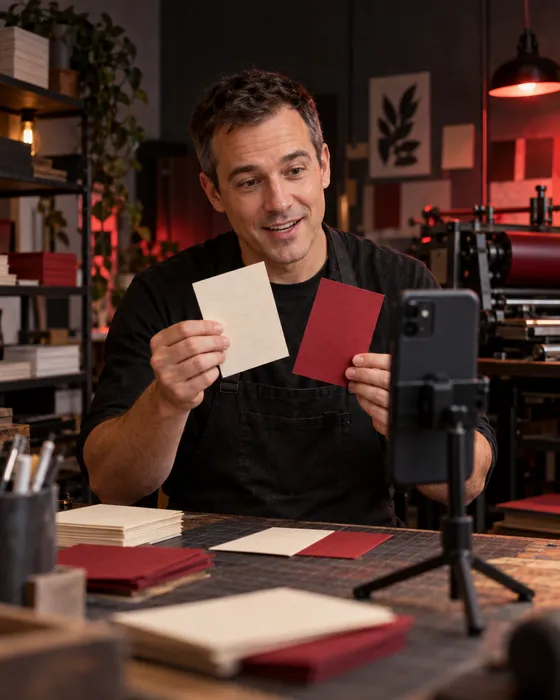
Show what makes your business worth choosing
Your regular customers know the care you put into a job. Someone finding you today has only a name, a few photos, and a lot of choices.
Show them how you work. A short video can make the finish, the process, and the person behind the business easier to trust. TokPromo helps more people find those videos.
Show the clean edge on a printed card, the detail in a finished repair, or the steps behind a design. Give a new viewer something they can judge with their own eyes.
What is included? What do you need from the customer? How does the job begin? Turn the answers you repeat every week into videos people can watch before getting in touch.
Finish a video and post it. TokPromo finds the new uploads covered by your plan and handles their ads. You can get back to customers, quotes, and the work they hired you to do.
Promotion that follows your posts
You should not have to set up another campaign every time you share a finished job. Choose how many new videos to promote each month and the budget for each one.
TokPromo promotes each eligible post while it is fresh. New viewers’ views, likes, and comments give TikTok more reasons to show your work to a bigger audience.
Post on your public account
Share a project, a process, or an answer to a customer question. You keep posting through TikTok as usual.
TokPromo finds the upload
We check your public profile for new videos. After approval, we run ads across mobile apps and websites in your selected country.
Viewers can tap through
The ad takes people to your TikTok post. They can watch, ask questions, and explore your profile to learn about the business.
You get a report for the post
Your report is ready as soon as promotion finishes. TokPromo uses the results to favor the apps and sites that bring the most interested viewers, and your next upload gets its own promotion automatically.
Your ads reach your whole country. That suits businesses that take work online or ship finished jobs, since every viewer is a potential customer. TokPromo targets by country, not by city or radius.
If you serve one town, say where you work in your videos and profile so the right viewers know you can help. For a campaign aimed at a smaller area, pair TokPromo with a tool that has local controls. TikTok Ads Manager lists city and postal code options, with availability that varies by market.
Useful answers make better first impressions
You do not need a dance, a big speech, or a film crew. Start with something a customer needs to see before choosing you.
“We care about quality” is easy to say. Showing the check you make before a job leaves the workshop gives that claim some weight.
Swipe across to read the full table.
| Business | Skip the vague claim | Open with something useful | What it tells a customer |
|---|---|---|---|
| Print studio | “We use premium materials.” | “Here is the same design on two papers.” Bend the samples and show each surface close up. | They can see what changes when they choose a material. |
| Clothing alterations | “We make clothes fit better.” | “Watch how this sleeve sits before and after the change.” Use the same pose for both views. | They can picture the kind of work you do. |
| Web design studio | “We build amazing websites.” | “This is where visitors got stuck trying to book.” Show a sample page before and after the fix. | They see a problem you know how to solve. |
| Custom cake business | “Every cake is made with love.” | “Here is how we plan the slices for twenty guests.” Show a sample cake and a serving diagram. | They know what to ask when ordering for an event. |
These are filming ideas. Choose promotion that fits the area you serve. For the video itself, stay with one question long enough to answer it. Show the useful step before you ask someone to follow or book.
TikTok’s creative advice recommends showing people, explaining the benefit early, and ending with a clear next step. Your workbench, sample project, or everyday tools can give you plenty to show.
Use work you have permission to share, or make a sample for the camera. A close view of your hands can explain a process without filming a customer. Keep names, addresses, and private messages out of the shot.
A small team. A clear plan.
Here is a fictional example: Luis and his partner run a print studio. They make menus, cards, and event stationery. Customers send a brief online, approve a sample layout, and receive the finished job by delivery.
They ship across their country, so they can take requests from beyond their town. They plan two videos a week, with TokPromo handling promotion for eight new posts.
Before filming, Luis checks that the quote form works on a phone. The studio’s profile says what it prints, where it delivers, and how to ask for a quote. He pins one finished project and one video explaining what to send.
He sets aside sample pieces for filming. A made up menu keeps a real client’s contact details off camera. He records the paper comparison, finishing checks, and packing clips while the tools are already set up.
Help a new viewer picture what the studio could make for them.
“One event, three matching pieces.” Lay out a sample invitation, menu, and place card. Show how the paper and print look together, then move close enough to see the edges.
Next step: Invite viewers planning an event to use the quote link on the profile.
Make an unfamiliar choice easier to understand.
“Same design. Two different papers.” Show a smooth sheet and a textured sheet in the same light. Explain which detail changes and let viewers see it.
Next step: Ask what they are making so the studio can explain which options may suit it.
Help someone make an inquiry the team can answer.
“Need a price for printed menus? Send these details.” Show a sample brief with the size, quantity, artwork status, delivery place, and date needed.
Next step: Point to the quote form, where those details can be sent privately.
Help a new client understand what they get to approve before printing.
“This check happens before we print your order.” Show a sample layout with a date or name highlighted. Explain what the customer reviews and how they approve it.
Next step: Invite viewers to ask about the approval step before sending a job.
Give a clear example of the care included in the service.
“Before these leave, we check the fold, edge, and print.” Show the sample checks one by one. Keep the camera close enough to see what Luis is looking for.
Next step: Point to the finished project pinned on the profile for a full view.
Answer how printed pieces travel without loose corners or bent sheets.
“Here is how we pack cards for delivery.” Show the backing, wrapping, and box with a sample order. Explain what customers should check when it arrives.
Next step: Ask viewers to include their delivery location when requesting a quote.
Help a customer leave time for artwork, approval, printing, and delivery.
“Tell us when you need the printed pieces in your hands.” Lay out cards for each stage. Explain that a print date and a delivery date are different.
Next step: Send viewers to current lead times and the quote form on the studio website.
Use an actual customer concern to choose the next useful post.
Pick a real question, such as “Can I send a design I made myself?” Show a sample file and explain what the studio needs to check before accepting it.
Next step: Invite viewers to send their file through the studio’s private inquiry process.
Each video does a different job. The first shows the result. The next ones explain choices, remove doubts, and help people ask for a quote. A viewer can start with any of them and still understand what the studio does.
At the end of each week, Luis notes which questions people asked. If several want to know about folded menus, he films that answer next. If most requests miss the date needed, he makes the deadline step clearer on the form and in the next video.
That example includes advertising, automatic post detection, campaign management, and reports. Luis and his partner still create the videos and answer customers. They choose a post count they can keep up with while finishing paid work.
Make it easy to take the next step
Someone likes your work but has never bought this service before. Help them know what to send and what will happen after they contact you.
“Get in touch” leaves them to figure it out. “Send the quantity, delivery location, and date needed for a quote” gives them a starting point.
Show the service in the video
Name the job you do and show a clear example. Say who it is for and where you can deliver or provide it.
Make the profile clear
Use the business name customers will recognize. State the service area, explain what you do, and keep the main contact details current.
Point to one contact option
Use the booking or inquiry link available on your account. Tell people what details to send. Keep private addresses, files, and job details out of public comments.
Explain the reply they can expect
Tell people who will reply, whether the first step is a quote or a call, and when they should hear back. Promise only a reply time your team can keep.
If your TikTok account cannot add a website link, name the business and the contact option you actually use. Do not point viewers to a link that is not there. Check the route on your phone as if you had never contacted the business before.
For Luis’s studio, a useful inquiry might read: “I need 100 A5 menus. My design is ready. Can you deliver them to Portland, Oregon, three weeks from now?” The team can check the job, date, and delivery before quoting. The customer knows what to ask without a long first call.
For appointment services, make it clear whether someone is requesting a time or making a confirmed booking. For custom work, explain what happens before a quote becomes an accepted job.
Content that fits a working week
The question someone asked on the phone this morning, the sample you made for a quote, and the check you do before handing over a job can all become videos.
Build your posts around work you already understand, then let TokPromo take care of the promotion.
If customers keep asking what is included, show the parts of the service in one clip. If a price depends on size or materials, show two sample jobs and explain what changes the work.
Record the finished piece, one useful step, and a common question while the tools and samples are out. These can become separate posts without setting up a shoot on three different days.
If your next opening is in three weeks, say so on your booking page. Use posts that will still make sense when promotion begins. Check dates and availability before sharing a short offer.
You can keep a familiar format without posting the same clip again. Show a new job, answer the next question, or explain a different choice. The topic stays close to your business, and each new video gives a viewer a fresh reason to watch.
Leave time to reply as well as post. Two useful videos you can follow up on may fit your week better than daily clips that leave inquiries unanswered. Our posting frequency guide helps you decide whether more posts are worth the extra time.
Look for interest you can act on
A comment saying “nice work” feels good. A request with the right service, location, and date tells you more about whether someone could become a customer.
Use the questions and inquiries to decide what to explain in your next video.
Swipe across to read the full table.
| What you notice | What to check | What to do next |
|---|---|---|
| Viewers leave before the useful part | The opening and time spent introducing yourself | Start with the finished work or the question you will answer. |
| People ask whether you work in their town | Your service area and the campaign’s location controls | Make the area clear. Use a separate campaign with local targeting when a small area is essential. |
| People ask for prices but omit key details | The instructions next to your inquiry form | Show the details you need for a quote, with one sample request. |
| Inquiries arrive but few quotes are accepted | Whether people understood the scope, price, and timing | Explain what is included and what changes the cost before they ask. |
| You receive more requests than you can answer | Your reply time, open slots, and current lead times | Update availability and pause future promotion if you need room to catch up. |
Check spend, reach, and traffic for each video in TokPromo. Use TikTok’s analytics for viewing behavior where available. Keep inquiries, quotes, and accepted jobs in your own business records. A view, a message, and a paid job are different results.
For each useful inquiry, note the service requested, whether you can serve the person, and what happened next. You can ask how they found you and use tagged links where your setup supports them. Line those notes up with your TokPromo reports to see which videos bring the best inquiries, then make more like them.
Review posts after the same amount of time. Give quotes time to be accepted, and count completed or paid work separately from requests. If another campaign or a referral brought the customer, keep that context with the record.
Start with the videos you can make while doing the work customers pay for. Pick a promotion budget that leaves room for materials, staff time, and other business costs. Increase it when the results and your capacity give you a reason to do so.
For help planning posts around customer questions, see our TikTok growth strategy. If you also want a campaign with a website or lead goal, our TokPromo and TikTok Promote comparison explains how the options fit together. If your main focus is an online product catalog, see TikTok promotion for ecommerce for product demos and store visits.
Build your plan
Choose how many videos you want promoted each month and the budget behind each one. Your monthly price updates instantly, with the mobile ad budget, automation, quality control, and reporting included.
days
Full purchase protectionUnconditional guarantee
Every new TokPromo plan includes an unconditional 14 day guarantee. If you decide it is not the right fit, contact support within 14 days of your purchase and your full initial plan payment is returned.
Your complete initial plan payment is returned, including promotion already delivered.
Views, followers, engagement, and campaign results never change the terms.
The same unconditional 14 day guarantee applies to every new plan and budget.
Start with confidence
Here’s how it works, what you control, and what to expect after you post.
Talk to the TokPromo teamYour ads reach people across the whole country you choose, which suits businesses that work online or ship across that country. TokPromo targets by country, not by city or radius. If you only serve one town, name it in your videos and pair TokPromo with a local campaign for that area.
Yes. Show the work you do, explain what is included, and answer the questions customers ask before getting a quote. TokPromo can promote those new public videos. It fits best when people across your selected country can use your service, such as work you deliver online or finished jobs you can ship.
The ad opens your TikTok video. From there, viewers can visit your profile and use the contact or booking link available on your account. Make that step clear in the video.
You make and publish the videos. We find the eligible new posts, run their ads, and provide a report for each one. You can film sample work, explain a choice, or answer a common question. You do not need to invent a new offer for every post.
No large following or website is required to promote an eligible public TikTok video. A clear profile helps new viewers understand your business. Show what you do, where you work, and how to contact you through the options your account supports. We only need your public handle, not your password.
No. You can show your hands, tools, sample work, or a screen recording with your voice explaining it. Film client work only when you have permission to use it in promotion. Keep private messages, contact details, and paperwork out of the shot.
You can pause or skip a video before promotion starts. Keep your profile and booking page clear about when you can take new work. Plans renew monthly, and you can cancel the next renewal from your account.
Yes. Promotion starts automatically once TokPromo finds the video and the ad is approved, so post it a little ahead of the event or offer. Include the date and location, and make sure the offer will still be valid when people see the ad.
Choose the number of videos you can finish each month and a budget per video. The example on this page promotes eight videos at $20 each. All plans include advertising, campaign management, and reports. Take the quiz for a starting plan, then adjust it to fit your business before you buy.
Every promoted video puts your work in front of people who have never heard of you, while the post is fresh. A clear service, a fair price, and a simple contact step turn that attention into inquiries. And if TokPromo is not the right fit, our unconditional 14 day guarantee refunds your full first payment, including promotion already delivered. There is no results target to meet.
Keep learning
Practical guides to help you plan your videos and turn new viewers into followers.
Recommended
Choose useful posts and learn what your audience wants to know.
Read moreRecommended
Make time for TikTok without letting extra posts take over the working week.
Read moreRecommended
See how regular post promotion and campaigns with a specific goal can work together.
Read moreReady for more viewers?
Choose how many videos to promote each month and the budget behind each one. Ads, setup, and reports are included in your price.
Build Your PlanNot sure where to start? Take the 1 minute quiz